

Before and now
The number no longer changes by itself
anny never raises or lowers the number of your add-ons automatically. When you make a resource bookable, it uses a free add-on. If none is free, anny shows, for example, All resources in use, and you add another one with Add resource. If you set a resource to a free status such as Live for viewing or archive it, its add-on becomes free. It stays in your subscription until you remove it. You see how many add-ons are in use and free under Account → Plan & Billing → Team plan → Usage and in the Add-ons in detail dialog.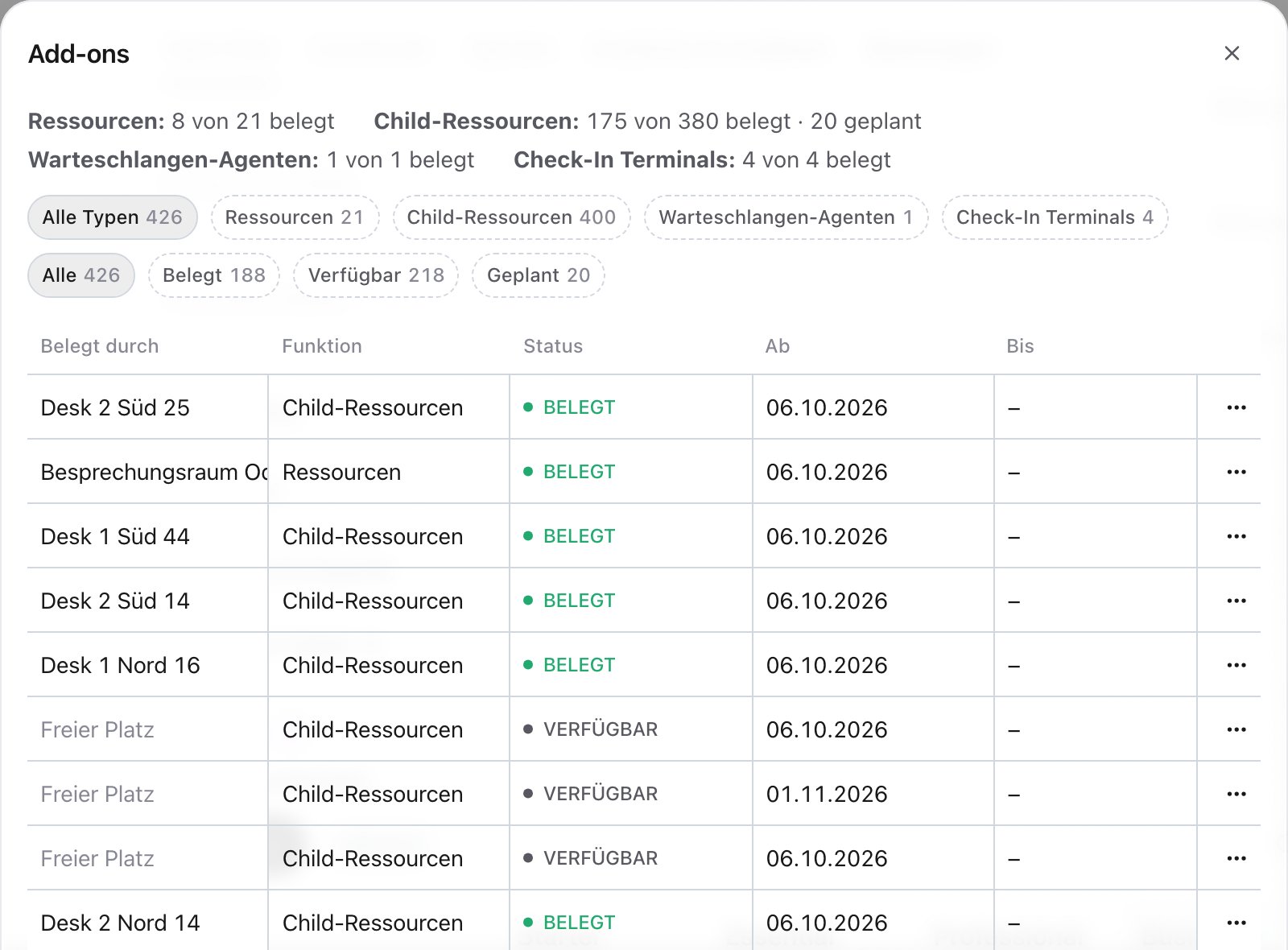
Add add-ons
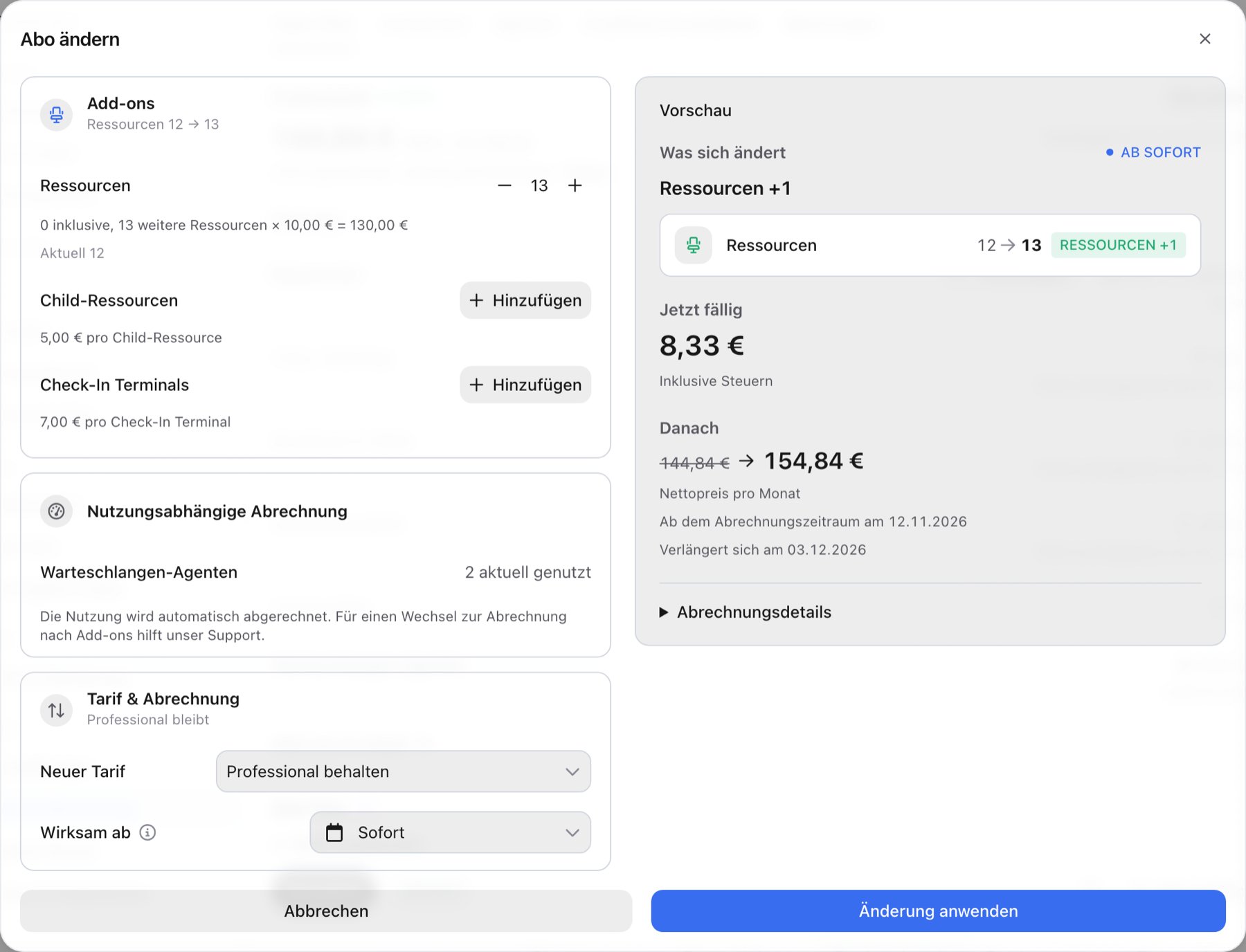
Click Add next to the count under Usage, or open Change subscription and raise the number under Add-ons.- Immediately: the add-on applies from now. Under Due now, the preview shows the prorated amount for the current billing period.
- On a date: choose a future day under Takes effect. The add-on starts and is charged then.
Remove add-ons
Open Change subscription and lower the number under Add-ons. You can only remove add-ons that are currently free. If a resource uses an add-on you no longer need, set it to a free status or archive it first. Under Takes effect you choose when the add-on ends: Immediately, At the end of the period or on another day. The preview shows how your price changes before you apply it.Schedule changes for later
You can schedule any change in the Change subscription dialog for a later date: more or fewer add-ons, another plan, or both together.1
Choose a date
Choose a future date under Takes effect, for example At the end of the period.
2
Schedule
Click Schedule for …. Until that day your subscription stays as it is.
3
Check the scheduled change
The Team plan tab shows the Scheduled for … card with the price from that day. The change takes effect automatically on that day. Until then you can withdraw it with Discard.
When add-ons are missing
If you use more units than your subscription has add-ons for, for example after the testing period ends or after a downgrade, they carry the Not in subscription badge, and a notice such as 2 resources not in your subscription appears at the top of the admin. You have 7 days to add add-ons. We remind you by email 5 days and 1 day before. After that anny disables the affected units; existing bookings stay. All details are in Add-ons in your anny plan.How existing subscriptions were moved
anny moved existing subscriptions once. Your subscription got as many add-ons as you were charged for in the last billing period, plus those included in your plan. So your next invoice stays the same. A cancelled subscription wasn’t moved: it keeps running on usage until it ends. Learn more in My billing was moved to add-ons.FAQ
Does my invoice go up when I make more resources bookable?
Does my invoice go up when I make more resources bookable?
Only if you add add-ons for them. If no add-on is free, the resource only becomes bookable once you add one.
Does my invoice go down when I use fewer resources?
Does my invoice go down when I use fewer resources?
Not by itself. Unused add-ons stay free in your subscription. Remove them via Change subscription, immediately or at the end of your billing period.
Can I remove add-ons only at the end of the billing period?
Can I remove add-ons only at the end of the billing period?
Yes. Under Takes effect, choose At the end of the period and click Schedule for …. Until then they stay in your subscription.
I made a mistake. Can I withdraw a scheduled change?
I made a mistake. Can I withdraw a scheduled change?
Yes. In the Team plan tab, click Discard on the Scheduled for … card. anny asks you to confirm first.
Do I need add-ons during the testing period?
Do I need add-ons during the testing period?
No. Your plan with its included add-ons only applies after the testing period. If some are missing then, you have 7 days from the end of the testing period.
Mine says “Usage-based billing”. What does that mean?
Mine says “Usage-based billing”. What does that mean?
For some existing subscriptions, anny still bills single types by usage. Nothing changes for you there. Contact support if you want add-on billing for them too.