

Before you start
- Permission: only owners and super admins can delete the organization. Everyone else sees the button grayed out with the note Only owners and super admins can delete the organization.
- Alternative: if you only want to stop paying, switch to the free Starter plan instead. Your data stays. Manage your anny plan explains how.
- Payouts: collect open payouts first under Account → Settings → Online payments.
What prevents a deletion
In these cases Delete organization is grayed out, and the danger zone shows you what’s left to do:
Delete the organization
1
Open the danger zone
Open Account → Settings → General and scroll all the way down to the Danger zone. Click Delete organization.
2
Check the date and give a reason
The top of the dialog shows the date the organization will be deleted. Choose a reason under What is the main reason?. Under Anything you want to tell us? you can add more if you like.
3
Confirm the name and request the deletion
Type your organization’s name exactly as shown to confirm. Then click Request deletion.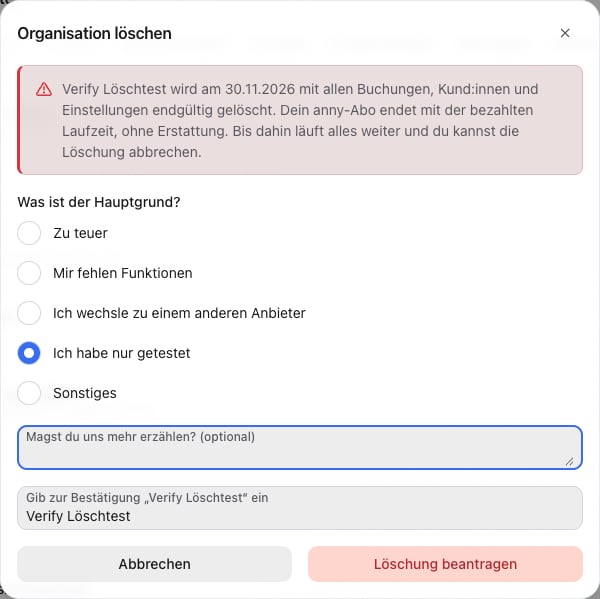
What happens until the deletion date
- The deletion date is 14 days after your request. If your paid anny subscription runs longer, the organization is deleted only when it ends. With a yearly subscription, that can take several months.
- Your anny subscription is canceled at the end of the paid period, without a refund. This applies to your team plan and your anny AI plan.
- Everything keeps working: your booking page stays online, and customers can still book. If you don’t want new bookings, set the toggle in the page header under Account → Settings to Booking page inactive.
- Email: all owners and everyone who may edit the organization receive an email with the subject “Organisation … will be deleted”, the deletion date and the Cancel deletion button.
- Notices in the admin area: the home page and the Team plan tab under Plan & Billing show This organization will be deleted on …. The sidebar shows Deleted on … on every page.

Cancel the deletion
Until the deletion date, you can cancel the deletion. Click Cancel deletion:- in the Danger zone under Account → Settings → General,
- in the notice on the home page or in the Team plan tab,
- or in the email you received after your request.

Your anny subscription stays canceled after you cancel the deletion. To keep it, click Reactivate on the canceled plan under Account → Plan & Billing.
Delete when you cancel
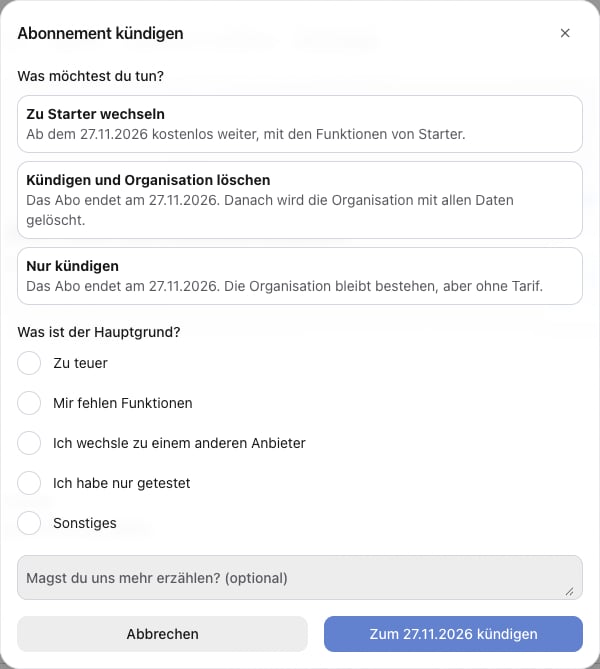
You can also request the deletion when you cancel your team plan. Open Account → Plan & Billing → Team plan and click Cancel. Under What would you like to do? you have three options:- Switch to Starter: you keep using anny for free after your term ends, and your data stays.
- Cancel and delete the organization: after Continue to deletion, the Delete organization dialog opens with your reason already filled in. From there it works as described above.
- Only cancel: your subscription ends, and the organization stays without a plan.
On the deletion date
anny deletes the organization with all its bookings, customers and settings. Admins who belong to no other organization are deleted as well. After that, you receive an email that the organization has been deleted. If something that prevents a deletion has come up in the meantime, for example a customer’s new running subscription, the deletion waits. As soon as you resolve it, the organization is deleted.FAQ
Can I delete my organization right away?
Can I delete my organization right away?
No. The organization is deleted 14 days after your request at the earliest, and not before your paid anny subscription ends. That gives you time to change your mind.
Do I get money back?
Do I get money back?
No. Your anny subscription ends with the paid period, without a refund. Until then you can use anny as usual.
Do my customers notice anything?
Do my customers notice anything?
Not until the deletion date: your booking page stays online. If you don’t want to take new bookings, set it to Booking page inactive.
I have issued invoices. How do I get rid of my data?
I have issued invoices. How do I get rid of my data?
We have to keep issued invoices because of the legal retention duty, so you can’t delete the organization yourself. Write to our support in the chat. We then delete everything else, for example your personal profile, so your data no longer appears and you stop receiving emails.
I'm a customer of an organization and want to delete my account.
I'm a customer of an organization and want to delete my account.
This article is for organizations that use anny. You delete your own profile with Delete profile, see User profile & settings.