

Available from the Essential plan. Each message sent is billed according to your plan. The switch is labeled Activate mobile messaging (chargeable).
How do mobile notifications work?
You find the settings in the sidebar under Account → Settings → General tab → Shop settings → Notifications group. There you turn on the channels and the events. At checkout, customers choose between WhatsApp and SMS.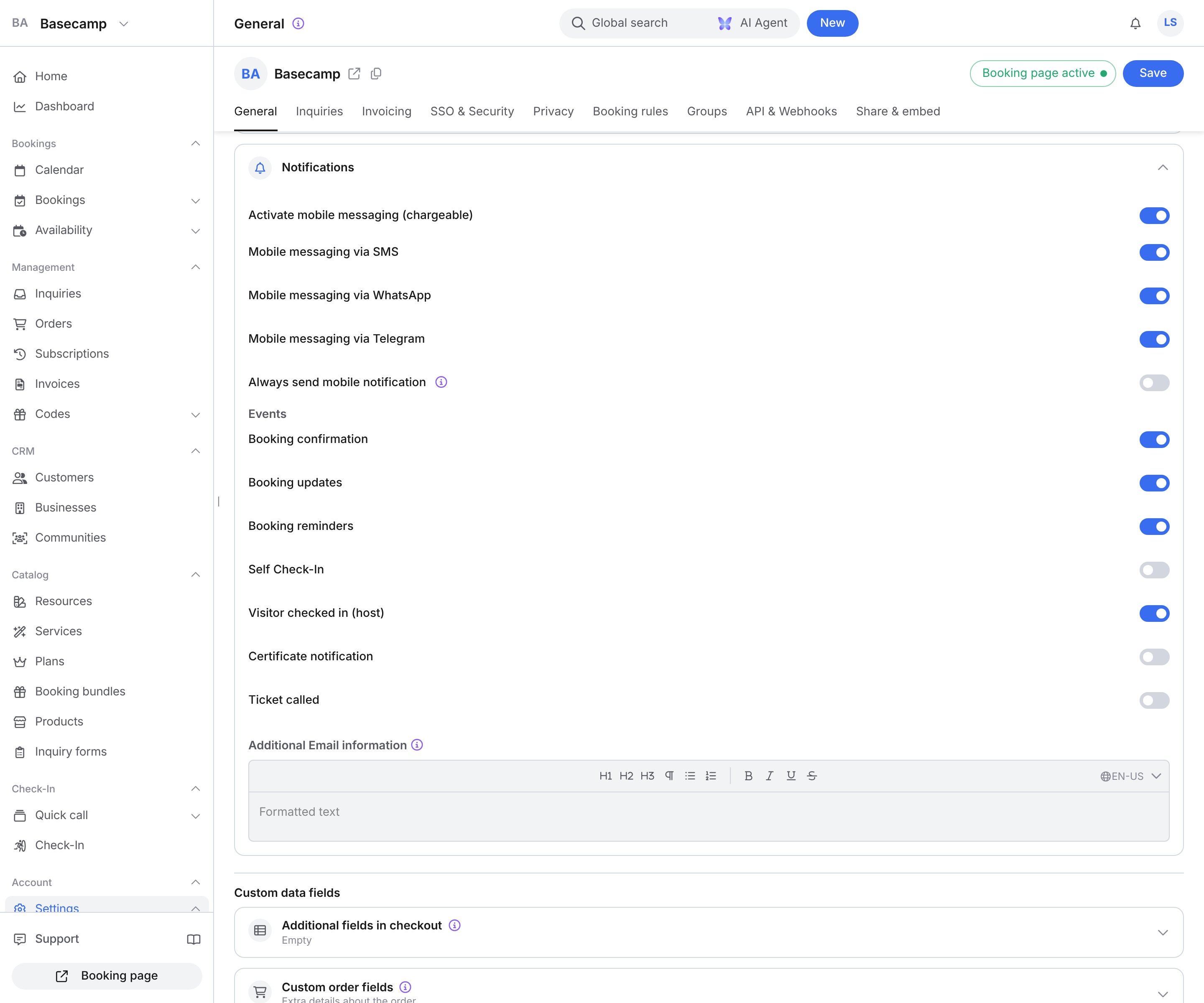
Available channels
Turning off the last channel also turns mobile messaging off.
Available events
Under Events you decide what sends a mobile message. Turning an event on also turns mobile messaging on.When do I use this?
- Customers must arrive on time (for example at a salon or a practice). A reminder by SMS or WhatsApp reduces no-shows.
- The host should learn immediately that a guest has arrived. Visitor checked in (host) tells the host as soon as the guest checks in.
- Customers do not read email promptly. A message on the phone is noticed sooner than mail in the inbox.
- Not suitable for purely internal planning with no customer contact. Email and the dashboard are enough for that.
Relationship to other features
- Check-in. Visitor checked in (host) requires the host to be assigned to the booking and to have a phone number.
- Broadcasting. Broadcasting uses its own channels for campaigns. Mobile notifications are tied to single events such as confirmation, change, or check-in.
Settings and options
Per-message prices are on your plan under Account → Settings → Subscription tab.
Examples
A salon sends the booking reminder via WhatsApp
A salon sends the booking reminder via WhatsApp
A salon wants fewer no-shows and turns on Booking reminders together with Mobile messaging via WhatsApp. You set the time and the text of the email reminder on the service under Notifications.
The host learns by SMS when a visitor checks in
The host learns by SMS when a visitor checks in
Turn on Visitor checked in (host) and Mobile messaging via SMS. The host needs a phone number. If the message should go out even without opt-in, also turn on Always send mobile notification.
FAQ
Are mobile notifications sent in addition to email?
Are mobile notifications sent in addition to email?
Yes. Mobile messages complement email. They do not replace it. Both can be active at the same time.
Can I see which mobile messages were sent?
Can I see which mobile messages were sent?
Yes. In the activity log of a booking or order you also see mobile messages and their delivery status.
What does a mobile message cost?
What does a mobile message cost?
The price per message depends on your plan. You find it under Account → Settings → Subscription tab.
Can customers opt out of mobile notifications?
Can customers opt out of mobile notifications?
Yes. At checkout and in their profile, customers decide whether they want mobile messages. Always send mobile notification overrides that decision and still sends the SMS.
Troubleshooting
The phone number warning appears
The phone number warning appears
If the switch shows The cell phone number is currently not displayed in the checkout fields., checkout does not ask for the number. In the same Shop settings view, open Additional fields in checkout and show Mobile number.
A customer receives no mobile message
A customer receives no mobile message
Check that Activate mobile messaging (chargeable) is on, that at least one channel and the matching event are on, and that the profile has a phone number.
The host is not told about the check-in
The host is not told about the check-in
Make sure Visitor checked in (host) is on, Mobile messaging via SMS is on, and the host has a phone number.
WhatsApp messages are not delivered
WhatsApp messages are not delivered
WhatsApp needs a phone number with an active WhatsApp account. Without that account the message is not delivered. Also turn on Mobile messaging via SMS.