

The Deletion periods feature must be activated under Account → Apps & Integrations → anny Apps (switch Enable for your organization).
How does the feature work?
As a data processor, anny does not delete any data on its own. You decide when and for how long personal data is stored, anonymized, or deleted. By default, anny stores data for at least 10 years. As soon as you activate the feature and configure your own periods, the following personal information is processed after the defined periods expire:- First and last name
- Email address
- Activities within the platform (e.g. bookings)
- Company
- Mobile number
Here is how to configure the periods:
1
Activate the feature
Navigate to Account → Apps & Integrations → anny Apps, open the Deletion periods app and turn on the switch Enable for your organization.
2
Open the Privacy tab
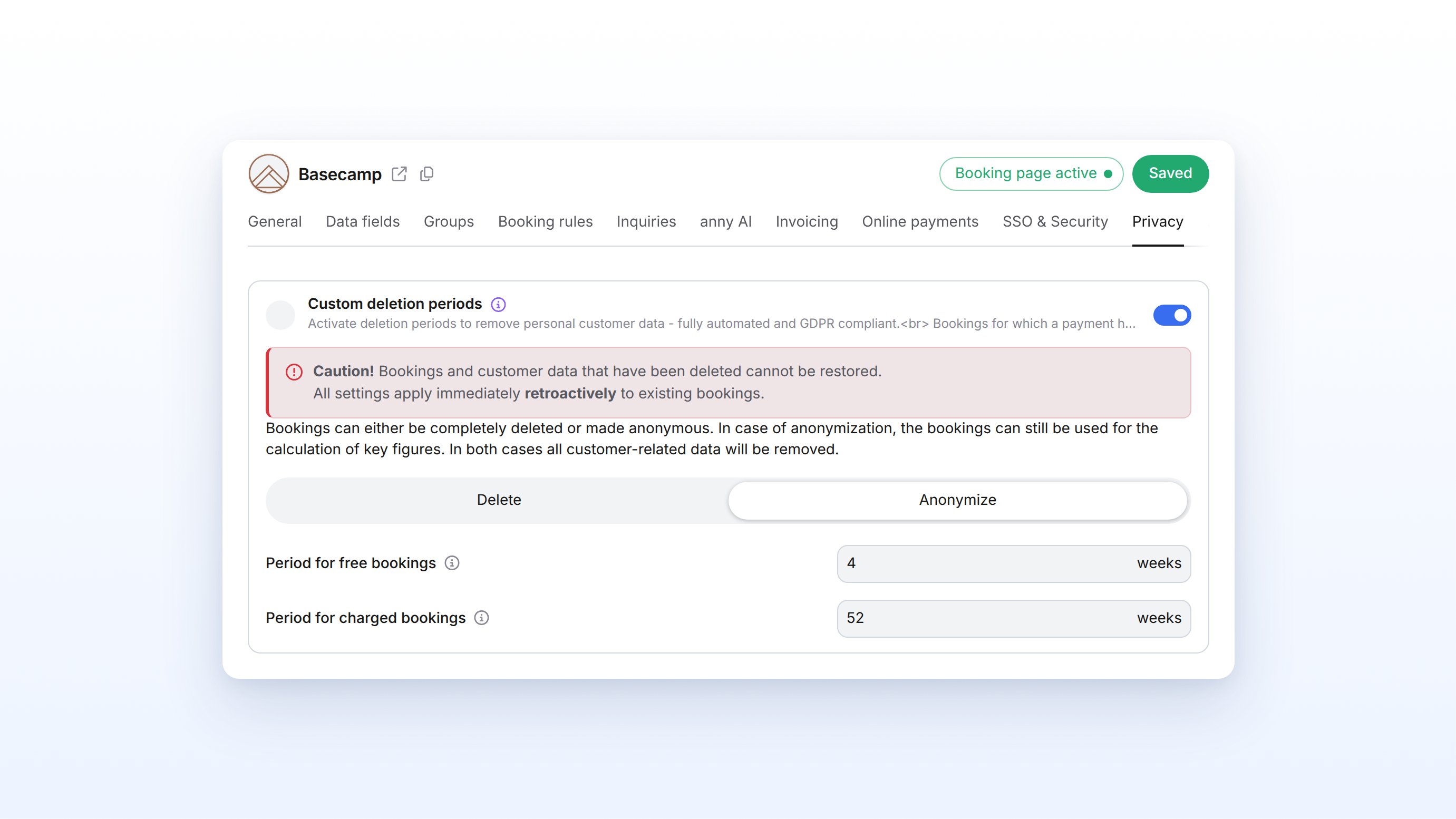
After activation, the Privacy tab becomes visible under Account → Settings. Click it.
3
Configure your own deletion periods
Select Custom deletion periods and choose between Anonymize or Delete. Set the periods for free and paid bookings separately. The period is defined in weeks (minimum: 1 week).
4
Save
Click Save to apply the settings.
When do I use this?
- You want to implement internal data privacy policies: Define individual retention periods for free and paid bookings separately.
- You run a university or desk sharing solution and need utilization data without personal reference: Use anonymization to enable statistical evaluations.
- You process particularly sensitive data (e.g. health programs): Use complete deletion so that no traceability is possible.
- Not suitable for: Pure visibility control within communities. For that, use the incognito mode in the community settings.
Settings & options
Practical examples
University anonymizes booking data after the end of the semester
University anonymizes booking data after the end of the semester
A university library wants to create utilization reports without permanently storing personal data.
Health provider deletes all data after the retention period
Health provider deletes all data after the retention period
A corporate health program requires the complete removal of all user data after the statutory retention obligation expires.
FAQ
Can I change the deletion period later?
Can I change the deletion period later?
Yes, you can adjust the periods at any time. However, data that has already been anonymized or deleted cannot be restored.
Is the data deleted immediately after the period expires?
Is the data deleted immediately after the period expires?
Processing happens automatically after the set period expires. The exact timing depends on the internal processing cycle.
What happens if I deactivate the feature again?
What happens if I deactivate the feature again?
Data that has already been processed remains anonymized or deleted. New data is stored again according to the default period of at least 10 years.
Does the period apply per booking or per customer?
Does the period apply per booking or per customer?
The period refers to the customer’s last activity. As long as active bookings exist, no data is processed.
Troubleshooting
The Privacy tab is not visible
The Privacy tab is not visible
The Deletion periods feature is not activated. Navigate to Account → Apps & Integrations → anny Apps and activate Deletion periods. The tab appears only after that.
Customer data is still visible despite the expired period
Customer data is still visible despite the expired period
Check whether the customer still has active bookings. As long as open bookings exist, deletion or anonymization is not carried out.
Community members are not anonymized
Community members are not anonymized
The deletion periods concern booking and customer data. You control visibility in communities via the incognito mode in the community settings.