> ## Documentation Index
> Fetch the complete documentation index at: https://docs.anny.co/llms.txt
> Use this file to discover all available pages before exploring further.
# 2025
> Follow the updates and improvements made to the anny platform in 2025.
## TikTok Pixel & Conversion API Integration
 Track and optimize your TikTok campaigns directly on your anny booking pages. anny now supports TikTok Pixel and Conversion API so you can better understand user behavior and improve ad performance.
❓**What it does**
* Add your TikTok Pixel ID in the anny admin to connect your booking pages with TikTok.
* anny automatically sends key events (e.g. page views, bookings) to TikTok whenever cookies are accepted.
* Optionally add an Access Token to enable TikTok Conversion API and track conversions even if users do not accept cookies.
* Use the event data in TikTok Ads Manager to analyze performance, build better audiences and let the algorithm optimize towards real bookings.
* Close tracking gaps with server‑side events so your reporting stays accurate and your optimization signals reliable.
💡 **Example**
A yoga studio can promote its classes on TikTok, see which campaigns drive the most bookings and automatically optimize spend based on real conversions.
This feature helps you measure the true impact of TikTok ads that link directly to your anny booking page and gives the TikTok algorithm better signals to find the right customers.
Find out more in the help center article: [https://docs.anny.co/de/articles/508569-tiktok-ads-tracking](https://docs.anny.co/de/articles/508569-tiktok-ads-tracking)
## Meta Pixel integration for precise conversion tracking
Track and optimize your TikTok campaigns directly on your anny booking pages. anny now supports TikTok Pixel and Conversion API so you can better understand user behavior and improve ad performance.
❓**What it does**
* Add your TikTok Pixel ID in the anny admin to connect your booking pages with TikTok.
* anny automatically sends key events (e.g. page views, bookings) to TikTok whenever cookies are accepted.
* Optionally add an Access Token to enable TikTok Conversion API and track conversions even if users do not accept cookies.
* Use the event data in TikTok Ads Manager to analyze performance, build better audiences and let the algorithm optimize towards real bookings.
* Close tracking gaps with server‑side events so your reporting stays accurate and your optimization signals reliable.
💡 **Example**
A yoga studio can promote its classes on TikTok, see which campaigns drive the most bookings and automatically optimize spend based on real conversions.
This feature helps you measure the true impact of TikTok ads that link directly to your anny booking page and gives the TikTok algorithm better signals to find the right customers.
Find out more in the help center article: [https://docs.anny.co/de/articles/508569-tiktok-ads-tracking](https://docs.anny.co/de/articles/508569-tiktok-ads-tracking)
## Meta Pixel integration for precise conversion tracking
 You can now connect your Meta Pixel directly in anny to track and optimize conversions from your booking pages.
❓**What it does**
* Add your Meta Pixel ID in the anny admin to automatically send booking events to Meta
* Tracks events when users accept cookies on your booking page
* Optionally add a Meta Conversion API access token to capture conversions even when cookies are rejected
* Sends relevant booking events to Meta so ad performance and attribution are more accurate
* Enables Meta’s ad algorithm to optimize delivery toward people who are more likely to book
💡 **Example**
A wakepark promoting tickets on Meta can now see exactly which ads lead to bookings and let the algorithm automatically find similar guests.
This feature helps you understand how well your Meta ads drive bookings and lets Meta optimize your campaigns based on real conversions, even with limited cookie data.
Find out more in the help center article: [https://docs.anny.co/en/articles/508568-set-up-meta-ads-tracking](https://docs.anny.co/en/articles/508568-set-up-meta-ads-tracking)
## Merge duplicate customers
You can now connect your Meta Pixel directly in anny to track and optimize conversions from your booking pages.
❓**What it does**
* Add your Meta Pixel ID in the anny admin to automatically send booking events to Meta
* Tracks events when users accept cookies on your booking page
* Optionally add a Meta Conversion API access token to capture conversions even when cookies are rejected
* Sends relevant booking events to Meta so ad performance and attribution are more accurate
* Enables Meta’s ad algorithm to optimize delivery toward people who are more likely to book
💡 **Example**
A wakepark promoting tickets on Meta can now see exactly which ads lead to bookings and let the algorithm automatically find similar guests.
This feature helps you understand how well your Meta ads drive bookings and lets Meta optimize your campaigns based on real conversions, even with limited cookie data.
Find out more in the help center article: [https://docs.anny.co/en/articles/508568-set-up-meta-ads-tracking](https://docs.anny.co/en/articles/508568-set-up-meta-ads-tracking)
## Merge duplicate customers
 You can now merge duplicate customers directly in anny. This keeps your customer database clean and ensures all bookings and subscriptions are collected under a single profile.
❓ **What it does**
* Adds a new **Merge** action in the customer table and customer detail view
* Lets admins select two customer records and merge them into one
* Transfers all bookings, subscriptions and related data to the target customer
* Updates missing data fields on the target customer with information from the other record
* Helps resolve duplicates that occur when customers book with multiple email addresses
💡 **Example**
If a customer has made a booking using their private email address and another using their company email address, you can now merge both records into one complete customer entry.
This feature reduces manual clean-up work and improves data quality in your admin area.
## n8n integration for custom workflows
You can now merge duplicate customers directly in anny. This keeps your customer database clean and ensures all bookings and subscriptions are collected under a single profile.
❓ **What it does**
* Adds a new **Merge** action in the customer table and customer detail view
* Lets admins select two customer records and merge them into one
* Transfers all bookings, subscriptions and related data to the target customer
* Updates missing data fields on the target customer with information from the other record
* Helps resolve duplicates that occur when customers book with multiple email addresses
💡 **Example**
If a customer has made a booking using their private email address and another using their company email address, you can now merge both records into one complete customer entry.
This feature reduces manual clean-up work and improves data quality in your admin area.
## n8n integration for custom workflows
 With the new n8n integration, you can use anny as a node in your n8n cloud workspace to automate complex, individual processes around bookings, customers and invoices. Authorization and webhook handling are managed directly in n8n, so you can focus on building smart workflows.
❓ **What it does**
* Provides a dedicated **anny node** in n8n Cloud
* Offers multiple **triggers**, such as:
* Booking created
* Booking checked in
* Booking starts
* Booking ends
* Invoice created
* Customer created
* Includes **actions** to interact with anny data via API
* Handles **authorization** and **webhook management** automatically
* Enables automations across CRM, newsletter systems, IoT hardware, accounting tools, and AI-powered workflows
* Supports connections to **1,269+ integrations** in n8n
## Custom Forms for Subscriptios
With the new n8n integration, you can use anny as a node in your n8n cloud workspace to automate complex, individual processes around bookings, customers and invoices. Authorization and webhook handling are managed directly in n8n, so you can focus on building smart workflows.
❓ **What it does**
* Provides a dedicated **anny node** in n8n Cloud
* Offers multiple **triggers**, such as:
* Booking created
* Booking checked in
* Booking starts
* Booking ends
* Invoice created
* Customer created
* Includes **actions** to interact with anny data via API
* Handles **authorization** and **webhook management** automatically
* Enables automations across CRM, newsletter systems, IoT hardware, accounting tools, and AI-powered workflows
* Supports connections to **1,269+ integrations** in n8n
## Custom Forms for Subscriptios
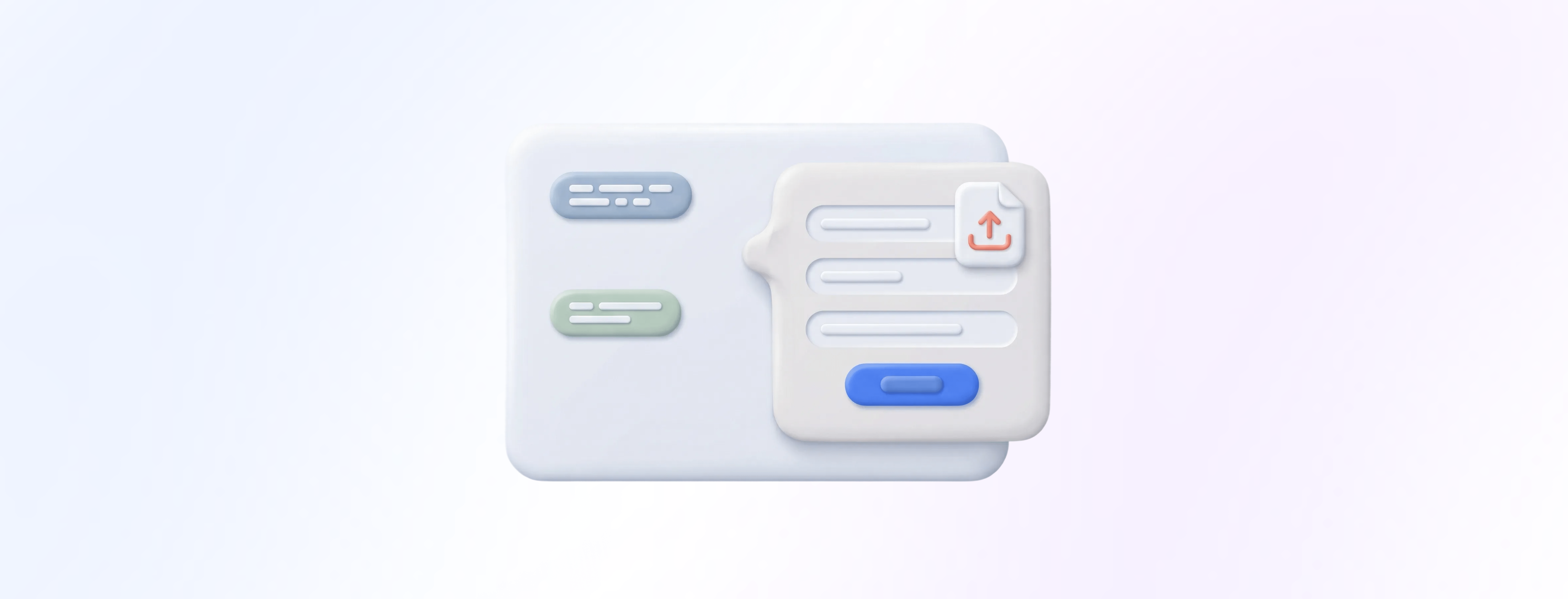 You can now create custom forms and attach them to your subscription plans to collect exactly the information you need from your customers, including file uploads.
**❓ What it does**
* Allows admins to create custom forms and link them to specific subscription plans
* Supports file uploads (e.g., PDFs, images) within subscription forms
* Shows submitted form data on the subscription detail page and/or the customer record, depending on configuration
* Ensures all required information for a subscription is collected during the first subscription purchase in the plan group
💡 **Example**
A coworking space offers a monthly membership that requires a brief KYC check.
You can now create custom forms and attach them to your subscription plans to collect exactly the information you need from your customers, including file uploads.
**❓ What it does**
* Allows admins to create custom forms and link them to specific subscription plans
* Supports file uploads (e.g., PDFs, images) within subscription forms
* Shows submitted form data on the subscription detail page and/or the customer record, depending on configuration
* Ensures all required information for a subscription is collected during the first subscription purchase in the plan group
💡 **Example**
A coworking space offers a monthly membership that requires a brief KYC check.
When a new member subscribes for the first time, they are automatically asked to complete a custom form that includes identification details and a PDF upload field.
The admin team can view the submitted file and data directly on the subscription record, no emails, no manual tracking, no missing documents.
## UniFi Smart Lock Integration: Automated Access Control per Booking
 Automatically connect your UniFi Door Access smart locks with anny bookings to grant and revoke access just in time. No more manual key handovers, spreadsheets or permanent access that nobody remembers to clean up.
❓ **What it does**
* Connects UniFi Door Access via host URL and API token directly with anny
* Creates time-boxed access per booking so guests only enter during their reserved slot
* Supports three types of access:
→ **Remote open**: one-click opening from anny as you are used to
→ **Visitor access**: PIN code that is valid between booking start and end time
→ **User access**: just-in-time access for existing UniFi users, adding the right access policy and locks for the booking duration and removing it afterward
* Lets you disable user access in the settings if you always want PIN-based visitor access instead
* Works only with UniFi Door Access devices (no WiFi management included)
💡 **Example**
A coworking space can automatically send a PIN code to meeting room guests for the exact booking time and revoke it afterward, without staff needing to be on site.
## Confirm all requested bookings in an order with one click
Automatically connect your UniFi Door Access smart locks with anny bookings to grant and revoke access just in time. No more manual key handovers, spreadsheets or permanent access that nobody remembers to clean up.
❓ **What it does**
* Connects UniFi Door Access via host URL and API token directly with anny
* Creates time-boxed access per booking so guests only enter during their reserved slot
* Supports three types of access:
→ **Remote open**: one-click opening from anny as you are used to
→ **Visitor access**: PIN code that is valid between booking start and end time
→ **User access**: just-in-time access for existing UniFi users, adding the right access policy and locks for the booking duration and removing it afterward
* Lets you disable user access in the settings if you always want PIN-based visitor access instead
* Works only with UniFi Door Access devices (no WiFi management included)
💡 **Example**
A coworking space can automatically send a PIN code to meeting room guests for the exact booking time and revoke it afterward, without staff needing to be on site.
## Confirm all requested bookings in an order with one click
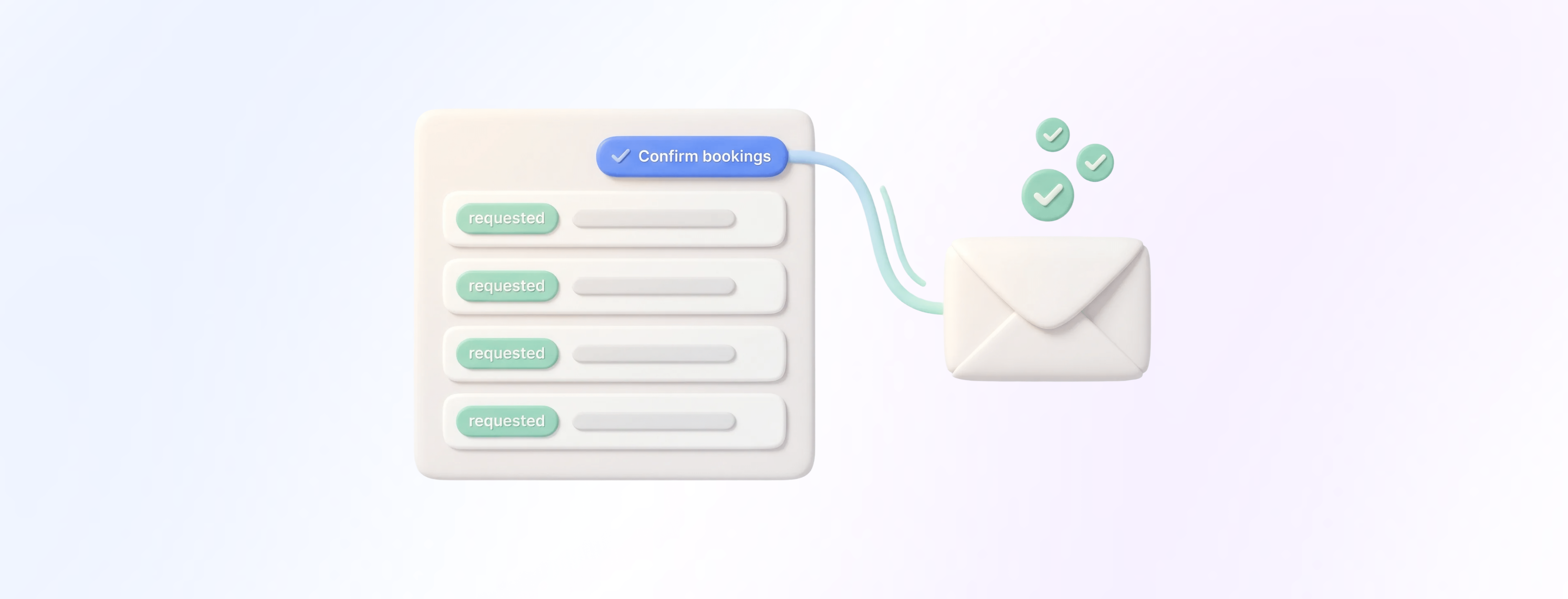 You can now confirm all requested bookings within a single order in one action. This is ideal for workflows with many booking requests, such as equipment rental or bulk reservations.
❓ **What it does**
* New action **“Confirm bookings”** available in the order detail view
* Action appears when *all* bookings in the order have the status **requested**
* Confirms all requested bookings in that order with one click
* End customers receive **one consolidated email** instead of multiple notifications
* Significant reduction of manual processing effort for large orders (e.g., 100+ bookings)
💡 **Example**
A customer submits a booking request for **30 pottery workshops** in one order. Instead of confirming each workshop individually, the admin opens the order and selects **“Confirm bookings”**. All 30 requested workshops are approved with a single click, and the customer receives just **one consolidated confirmation email**.
Find out more in the helpcenter article: [https://docs.anny.co/en/articles/374769-booking-management-with-anny](https://docs.anny.co/en/articles/374769-booking-management-with-anny)
## Updated Outlook add-in
You can now confirm all requested bookings within a single order in one action. This is ideal for workflows with many booking requests, such as equipment rental or bulk reservations.
❓ **What it does**
* New action **“Confirm bookings”** available in the order detail view
* Action appears when *all* bookings in the order have the status **requested**
* Confirms all requested bookings in that order with one click
* End customers receive **one consolidated email** instead of multiple notifications
* Significant reduction of manual processing effort for large orders (e.g., 100+ bookings)
💡 **Example**
A customer submits a booking request for **30 pottery workshops** in one order. Instead of confirming each workshop individually, the admin opens the order and selects **“Confirm bookings”**. All 30 requested workshops are approved with a single click, and the customer receives just **one consolidated confirmation email**.
Find out more in the helpcenter article: [https://docs.anny.co/en/articles/374769-booking-management-with-anny](https://docs.anny.co/en/articles/374769-booking-management-with-anny)
## Updated Outlook add-in
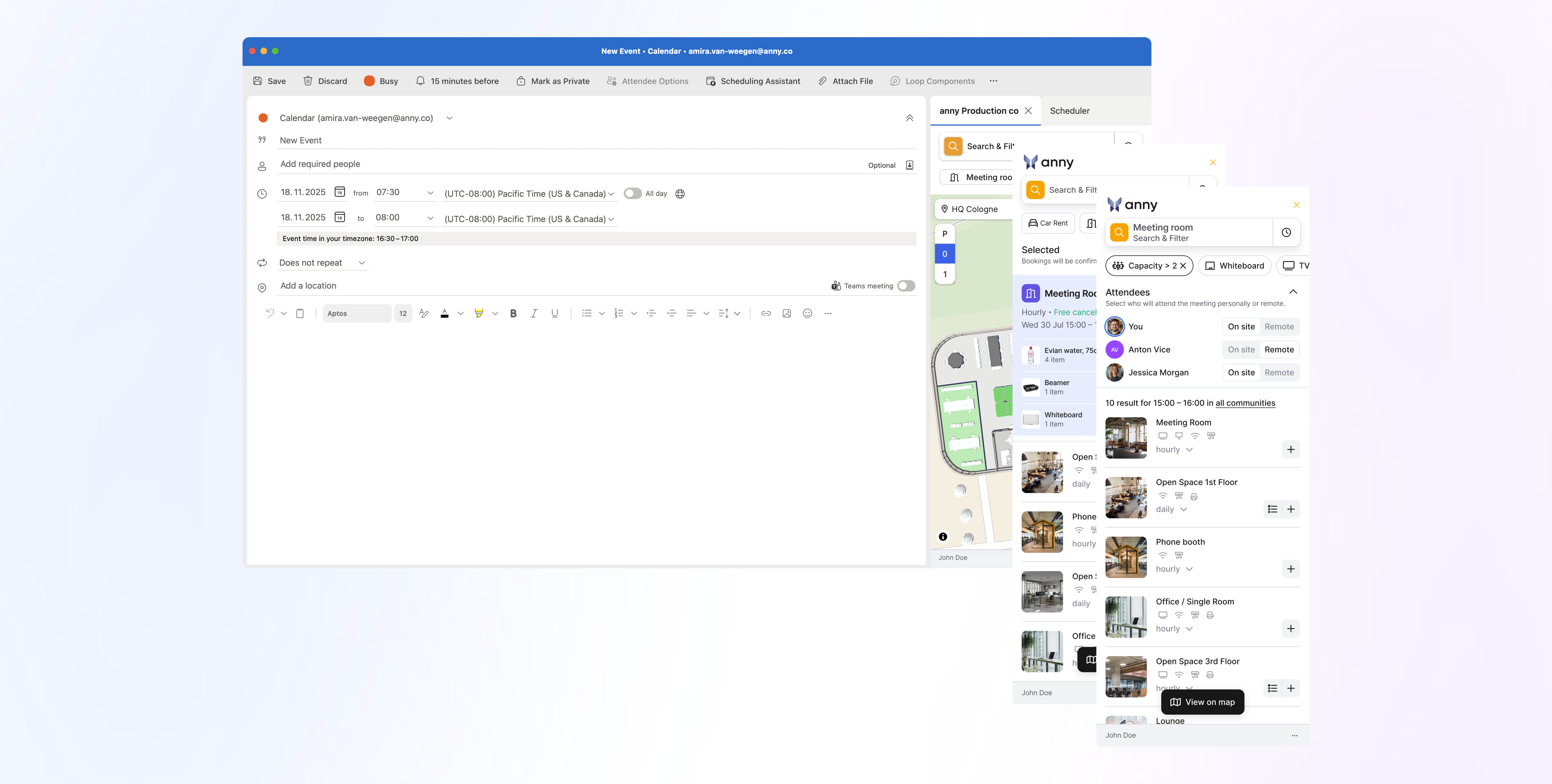 We’ve released a major update to the anny Outlook Add-In, delivering a completely redesigned interface and several new features that make scheduling with anny inside Outlook faster and more intuitive.
❓**What it does**
* **Full compatibility with both** [**anny.eu**](http://anny.eu) **and** [**anny.co**](http://anny.co)
* **Automatic login** for all users who authenticate via Microsoft SSO
* **Capacity-based filtering** when adding participants to a booking (provided that the capacity property is specified for the rooms)
* **New map view** for easier spatial navigation
* **Completely redesigned UI** for a cleaner and more modern experience
* **Participant synchronization:** Outlook attendees are now synced directly into the anny booking
* **Free-text search** in the add-in
* **Manage bookings after scheduling:** View, cancel or add bookings to existing Outlook events
* All directly available **inside the Outlook Add-In when creating or editing appointments**
This update brings a faster, more intuitive workflow to everyday scheduling — especially for teams who regularly connect Outlook appointments with resource bookings in anny.
See how to install it here: [https://docs.anny.co/en/articles/111817-how-do-i-add-the-outlook-add-in](https://docs.anny.co/en/articles/111817-how-do-i-add-the-outlook-add-in)
## Advanced Service Setting: Allow Cross-Blocker Bookings
We’ve released a major update to the anny Outlook Add-In, delivering a completely redesigned interface and several new features that make scheduling with anny inside Outlook faster and more intuitive.
❓**What it does**
* **Full compatibility with both** [**anny.eu**](http://anny.eu) **and** [**anny.co**](http://anny.co)
* **Automatic login** for all users who authenticate via Microsoft SSO
* **Capacity-based filtering** when adding participants to a booking (provided that the capacity property is specified for the rooms)
* **New map view** for easier spatial navigation
* **Completely redesigned UI** for a cleaner and more modern experience
* **Participant synchronization:** Outlook attendees are now synced directly into the anny booking
* **Free-text search** in the add-in
* **Manage bookings after scheduling:** View, cancel or add bookings to existing Outlook events
* All directly available **inside the Outlook Add-In when creating or editing appointments**
This update brings a faster, more intuitive workflow to everyday scheduling — especially for teams who regularly connect Outlook appointments with resource bookings in anny.
See how to install it here: [https://docs.anny.co/en/articles/111817-how-do-i-add-the-outlook-add-in](https://docs.anny.co/en/articles/111817-how-do-i-add-the-outlook-add-in)
## Advanced Service Setting: Allow Cross-Blocker Bookings
 A new advanced service setting is now available: **Allow Cross-Blocker Bookings**. When enabled, bookings are permitted to start **before** a blocker and end **after** a blocker.
❓**What it does**
* Allows bookings to extend across existing blockers
* Bookings may begin before a blocker and finish after a blocker
* Provides more flexibility for services with overlapping time needs
💡 **Example**
A meeting room has a 10-minute buffer blocker between two time slots for a quick room reset.
A new advanced service setting is now available: **Allow Cross-Blocker Bookings**. When enabled, bookings are permitted to start **before** a blocker and end **after** a blocker.
❓**What it does**
* Allows bookings to extend across existing blockers
* Bookings may begin before a blocker and finish after a blocker
* Provides more flexibility for services with overlapping time needs
💡 **Example**
A meeting room has a 10-minute buffer blocker between two time slots for a quick room reset.
Another team wants to book the room for the entire morning:
* 09:00–12:00
→ 10:50–11:00 blocker
With the new setting, this booking can now still be made.
Read on here: [https://docs.anny.co/en/articles/249541-global-blockers-and-holiday-blockers](https://docs.anny.co/en/articles/249541-global-blockers-and-holiday-blockers)
## Improved Participant Management
 We’ve introduced several enhancements to make managing participants in bookings more flexible and transparent across tools.
**❓ What’s new**
* **Define minimum and maximum participant numbers:** You can now set clear participation limits for each booking to ensure capacity requirements are met.
* **Full compatibility with external calendars:** Participants are automatically added to Outlook, Google Calendar & other connected calendars, including invitation handling.
* **Participants visible everywhere:** In the Planner, Calendar, and on Display, all assigned participants are now shown, providing a clearer overview of who is attending.
* **Integrated RSVP management in anny:** When participants are added to a booking, they can respond to it. All responses are synced, giving you up-to-date attendance information at a glance.
**💡 Example**
A team books a **meeting room for a workshop**:
* The service requires **at least 3 and max. 12 participants**, so the booking automatically checks the correct capacity.
* When the organizer adds participants, they are **instantly added to the Outlook or Google Calendar event**, including the official invitation.
* In the **Planner, Calendar, and Display views**, everyone can immediately see **who is attending** the workshop.
* Each participant can **RSVP directly in anny** (accept or decline), and these responses are synced across anny and external calendars, giving the organizer a clear, up-to-date view of attendance.
Learn more here: [https://docs.anny.co/en/articles/470645-participants-management](https://docs.anny.co/en/articles/470645-participants-management)
## Designer 2.2: Performance & usability enhancements
We’ve introduced several enhancements to make managing participants in bookings more flexible and transparent across tools.
**❓ What’s new**
* **Define minimum and maximum participant numbers:** You can now set clear participation limits for each booking to ensure capacity requirements are met.
* **Full compatibility with external calendars:** Participants are automatically added to Outlook, Google Calendar & other connected calendars, including invitation handling.
* **Participants visible everywhere:** In the Planner, Calendar, and on Display, all assigned participants are now shown, providing a clearer overview of who is attending.
* **Integrated RSVP management in anny:** When participants are added to a booking, they can respond to it. All responses are synced, giving you up-to-date attendance information at a glance.
**💡 Example**
A team books a **meeting room for a workshop**:
* The service requires **at least 3 and max. 12 participants**, so the booking automatically checks the correct capacity.
* When the organizer adds participants, they are **instantly added to the Outlook or Google Calendar event**, including the official invitation.
* In the **Planner, Calendar, and Display views**, everyone can immediately see **who is attending** the workshop.
* Each participant can **RSVP directly in anny** (accept or decline), and these responses are synced across anny and external calendars, giving the organizer a clear, up-to-date view of attendance.
Learn more here: [https://docs.anny.co/en/articles/470645-participants-management](https://docs.anny.co/en/articles/470645-participants-management)
## Designer 2.2: Performance & usability enhancements
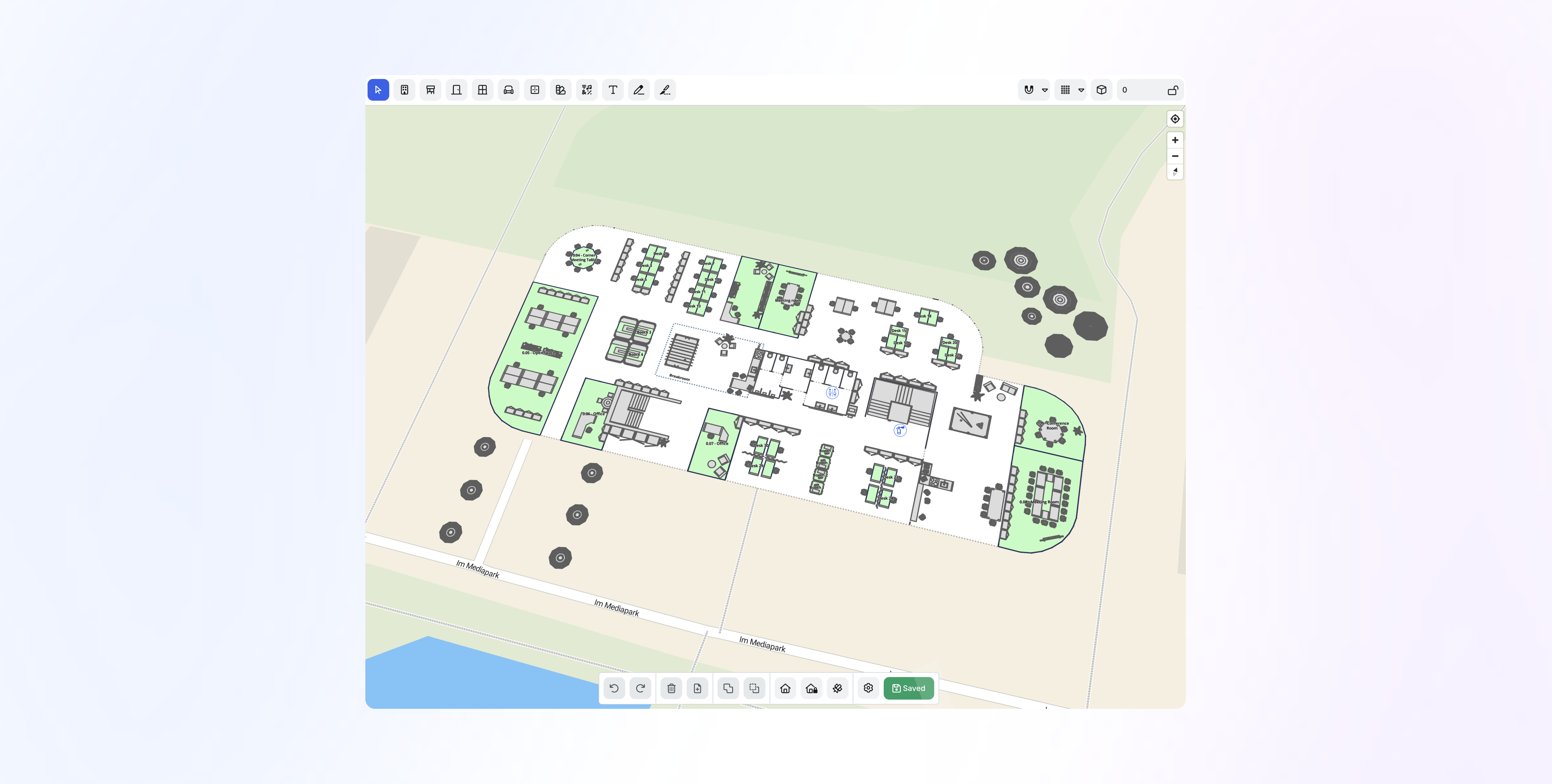 The latest update to the anny Designer brings several enhancements that make creating and editing booking pages faster and more intuitive.
❓**What’s new**
* **Improved performance:** Faster loading and smoother interactions when working with complex layouts or larger designs.
* **Simplified element grouping:** Elements can now be grouped and managed more easily, making layouts clearer and reducing editing steps.
* **Updated interface design:** Visual optimizations for a cleaner, more consistent design experience.
These improvements make the Designer more responsive and user-friendly.
## Simplified Selection on the Booking Page
The latest update to the anny Designer brings several enhancements that make creating and editing booking pages faster and more intuitive.
❓**What’s new**
* **Improved performance:** Faster loading and smoother interactions when working with complex layouts or larger designs.
* **Simplified element grouping:** Elements can now be grouped and managed more easily, making layouts clearer and reducing editing steps.
* **Updated interface design:** Visual optimizations for a cleaner, more consistent design experience.
These improvements make the Designer more responsive and user-friendly.
## Simplified Selection on the Booking Page
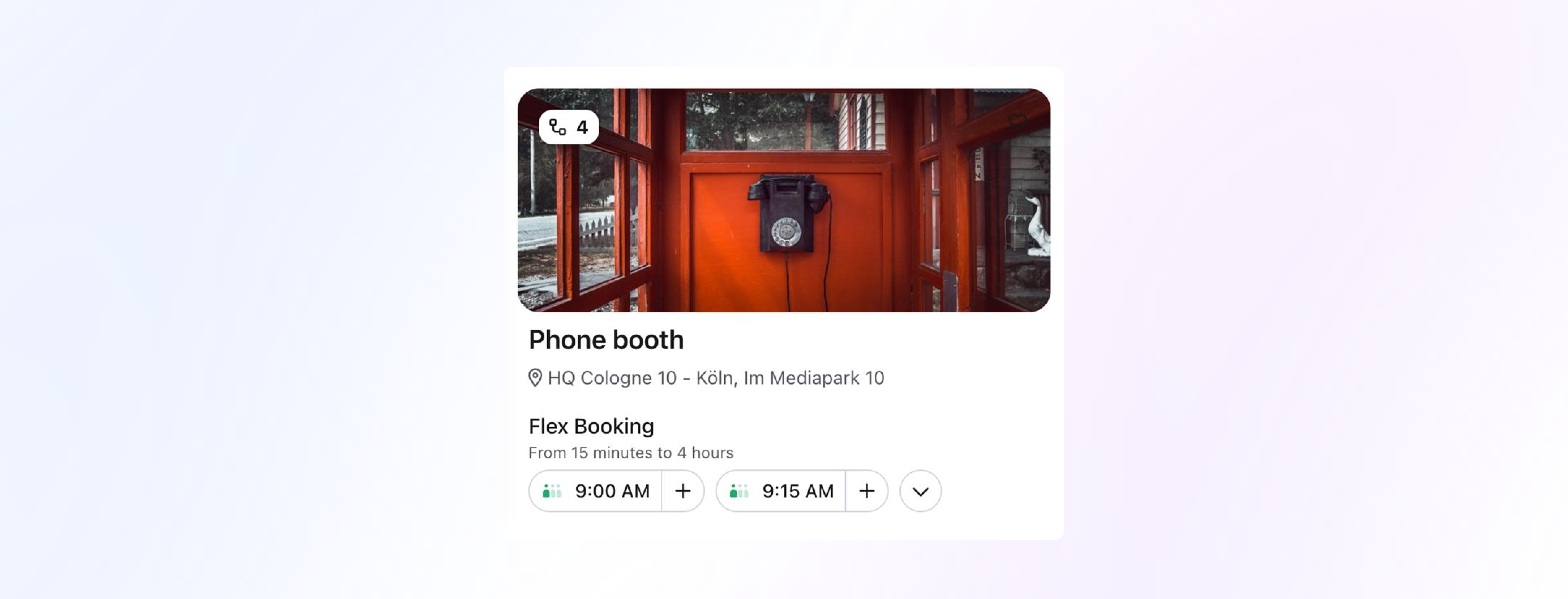 We’ve introduced a streamlined way to **add resources to the cart directly from the booking flow**, especially helpful for customers who rent out resources for short periods.
❓**What it does**
* Activates automatically when using the **date and time filter** on the Explore page.
* Adds a **“+” button** to the available time slots (“time pills”), allowing you to add the selected resource with the chosen service directly to the cart.
* The selected **service can be adjusted** using the arrow buttons before adding it to the cart.
* **Add-ons** can be selected later during the checkout process.
* The **booking title step is skipped**, even if it’s normally required, to speed up the flow.
💡 **Example**
If you rent out short-term resources like sports courts, meeting rooms, or equipment, users can now select a time slot on the booking page and add it to the cart instantly. making the booking process faster.
## Remote-Open for Smart Locks
We’ve introduced a streamlined way to **add resources to the cart directly from the booking flow**, especially helpful for customers who rent out resources for short periods.
❓**What it does**
* Activates automatically when using the **date and time filter** on the Explore page.
* Adds a **“+” button** to the available time slots (“time pills”), allowing you to add the selected resource with the chosen service directly to the cart.
* The selected **service can be adjusted** using the arrow buttons before adding it to the cart.
* **Add-ons** can be selected later during the checkout process.
* The **booking title step is skipped**, even if it’s normally required, to speed up the flow.
💡 **Example**
If you rent out short-term resources like sports courts, meeting rooms, or equipment, users can now select a time slot on the booking page and add it to the cart instantly. making the booking process faster.
## Remote-Open for Smart Locks
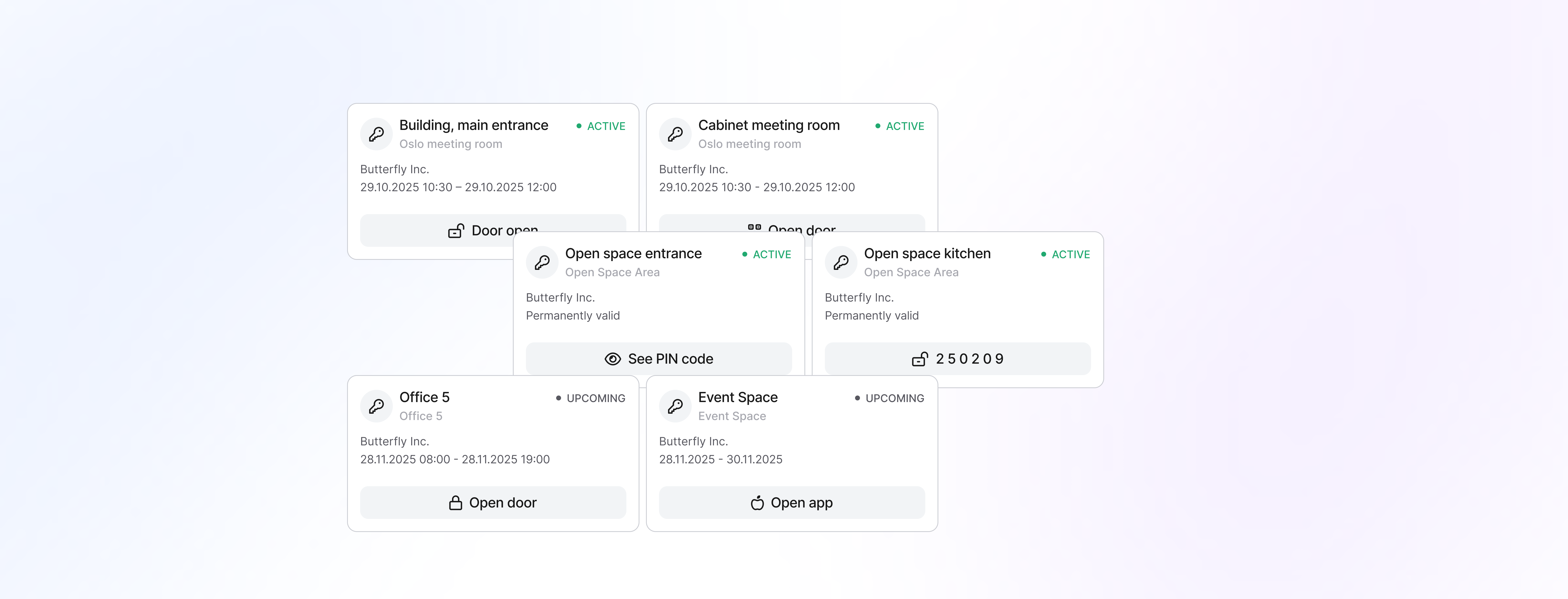 Your customers can now open booked rooms **directly from the anny app**, but only if they have a valid booking.
With the new **Remote-open** feature (available for **Nuki** and **Kleverkey**) and a new dedicated section on the anny homepage, access is now even smoother, while remaining secure and fully tied to valid booking rules or community access.
❓**What it does**
* Enables **remote unlocking** of doors directly from the anny app (Tap to open)
* Provides additional access options depending on the Smart Lock provider:
* **QR code** displayed in the app
* **PIN code** shown in the app
* **Direct launch** of the provider’s Smart Lock app
* Shows all available Smart Locks on the **anny homepage** in a dedicated section
* Ensures access only works within a **valid booking timeframe** or for users with **community access**
* Available in both the **anny mobile app** and the **web app**
🔑 **Provider-specific setup**
**Nuki**
* Re-authorize the integration once in the anny admin area
* You will be prompted to allow **Remote-access**
* Afterwards, enable **Remote-open per rule**
**KleverKey**
* Remote-open is available immediately
* Simply activate **Remote-open per rule**
Find more information in our helpcenter article: [https://docs.anny.co/en/articles/30481-smart-lock-integrations](https://docs.anny.co/en/articles/30481-smart-lock-integrations)
## Add Images, Videos & Files to Resource Descriptions
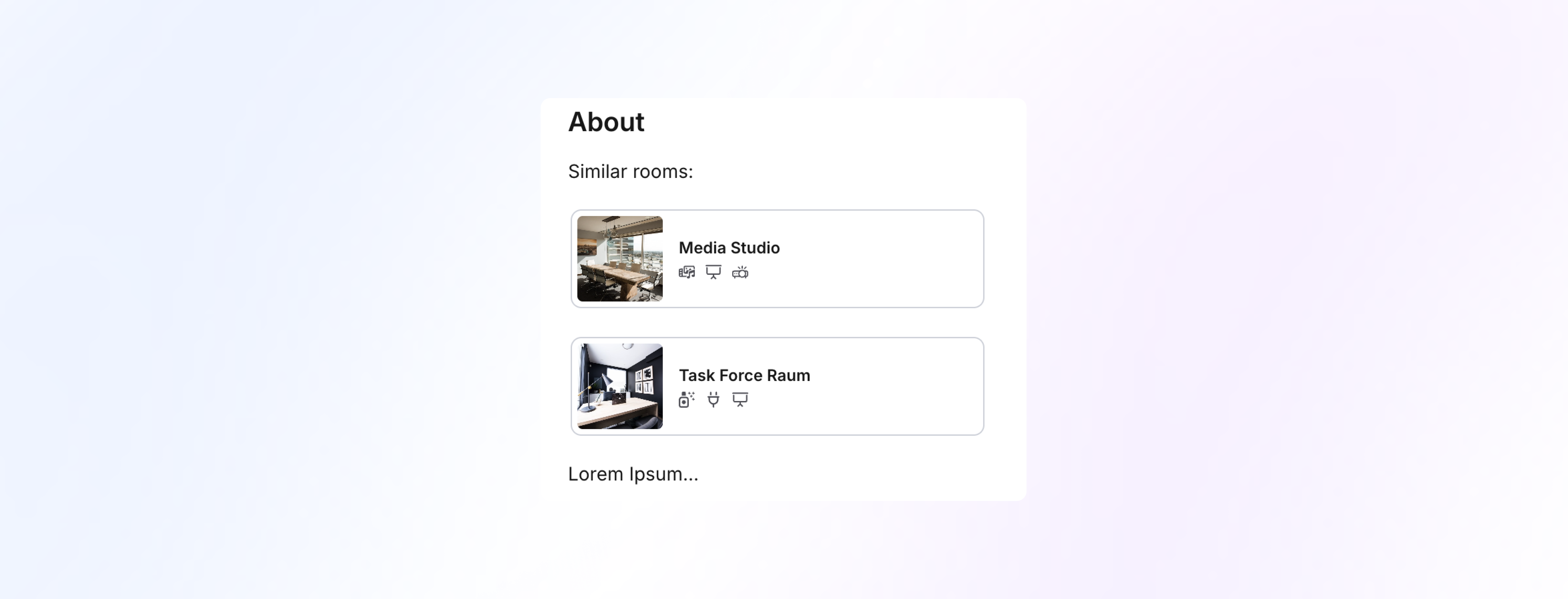 You can now enhance your resource descriptions by embedding **images, videos and files** directly within the text. This allows you to present resources more visually and provide important information right where users expect it.
❓ **What it does**
* Allows you to insert images directly into the resource description for better visual presentation.
* Supports embedding videos (via YouTube, Vimeo or Loom) inside the description.
* Enables adding files such as PDFs directly into the text.
* Helps structure content more clearly with visual elements placed exactly where they add the most context.
💡 **Example**
In the description of a **padel court**, you can now embed:
* an **image of the court**
* a **short introduction video** explaining how to use the court
* a **PDF with game rules**
This gives players all essential information at a glance, reduces follow-up questions, and provides a more complete and professional presentation of the resource.
## Add Files to Your Resource Pages
You can now enhance your resource descriptions by embedding **images, videos and files** directly within the text. This allows you to present resources more visually and provide important information right where users expect it.
❓ **What it does**
* Allows you to insert images directly into the resource description for better visual presentation.
* Supports embedding videos (via YouTube, Vimeo or Loom) inside the description.
* Enables adding files such as PDFs directly into the text.
* Helps structure content more clearly with visual elements placed exactly where they add the most context.
💡 **Example**
In the description of a **padel court**, you can now embed:
* an **image of the court**
* a **short introduction video** explaining how to use the court
* a **PDF with game rules**
This gives players all essential information at a glance, reduces follow-up questions, and provides a more complete and professional presentation of the resource.
## Add Files to Your Resource Pages
 You can now upload **attachments directly to your resource pages** in anny, this makes it easier to provide important documents, images or videos associated with each resource.
❓ **What it does**
* Allows you to attach files, images, archives, and videos to any resource.
* Files appear on the resource’s booking page, where they can be downloaded or viewed by users.
* Typical use cases include:
* Catering menu
* Product data sheet for equipment
* Seating plans or room layouts
* Tutorial videos
* Upload is simple: just open the resource, scroll to the “Files” section, drag & drop or select the file, then save.
**💡 Example**
For an event space that includes catering options, you can now upload the catering menu as a PDF. Visitors to the booking page will see the document ready for download or review, without you needing to send it separately.
Learn more here about the file types: [https://docs.anny.co/en/articles/445803-how-can-i-attach-files-images-videos-documents-to-a-resource](https://docs.anny.co/en/articles/445803-how-can-i-attach-files-images-videos-documents-to-a-resource)
## Link Resources, Plans & Booking Packages in Service Descriptions
You can now upload **attachments directly to your resource pages** in anny, this makes it easier to provide important documents, images or videos associated with each resource.
❓ **What it does**
* Allows you to attach files, images, archives, and videos to any resource.
* Files appear on the resource’s booking page, where they can be downloaded or viewed by users.
* Typical use cases include:
* Catering menu
* Product data sheet for equipment
* Seating plans or room layouts
* Tutorial videos
* Upload is simple: just open the resource, scroll to the “Files” section, drag & drop or select the file, then save.
**💡 Example**
For an event space that includes catering options, you can now upload the catering menu as a PDF. Visitors to the booking page will see the document ready for download or review, without you needing to send it separately.
Learn more here about the file types: [https://docs.anny.co/en/articles/445803-how-can-i-attach-files-images-videos-documents-to-a-resource](https://docs.anny.co/en/articles/445803-how-can-i-attach-files-images-videos-documents-to-a-resource)
## Link Resources, Plans & Booking Packages in Service Descriptions
 You can now add direct links to **resources**, **subscription plans**, and **booking packages** within your service descriptions. This makes it easier to structure information and highlight relevant connections between your offerings.
**❓ What it does**
* Allows you to link relevant **resources** directly inside the service description.
* Supports linking to **plans**, e.g., membership.
* Enables linking **booking packages**, useful when a service can be combined with package-based bookings.
* Lets users open linked elements immediately, without having to search for them elsewhere.
**💡 Example**
In the description of a **Coworking Open Space** resource, you can now directly link:
You can now add direct links to **resources**, **subscription plans**, and **booking packages** within your service descriptions. This makes it easier to structure information and highlight relevant connections between your offerings.
**❓ What it does**
* Allows you to link relevant **resources** directly inside the service description.
* Supports linking to **plans**, e.g., membership.
* Enables linking **booking packages**, useful when a service can be combined with package-based bookings.
* Lets users open linked elements immediately, without having to search for them elsewhere.
**💡 Example**
In the description of a **Coworking Open Space** resource, you can now directly link:
– a meeting room,
– a 5-session pass, and
– the corresponding membership plans.
This gives users an immediate overview of all connected options without having to search elsewhere.
## AI-Powered Automatic Translations
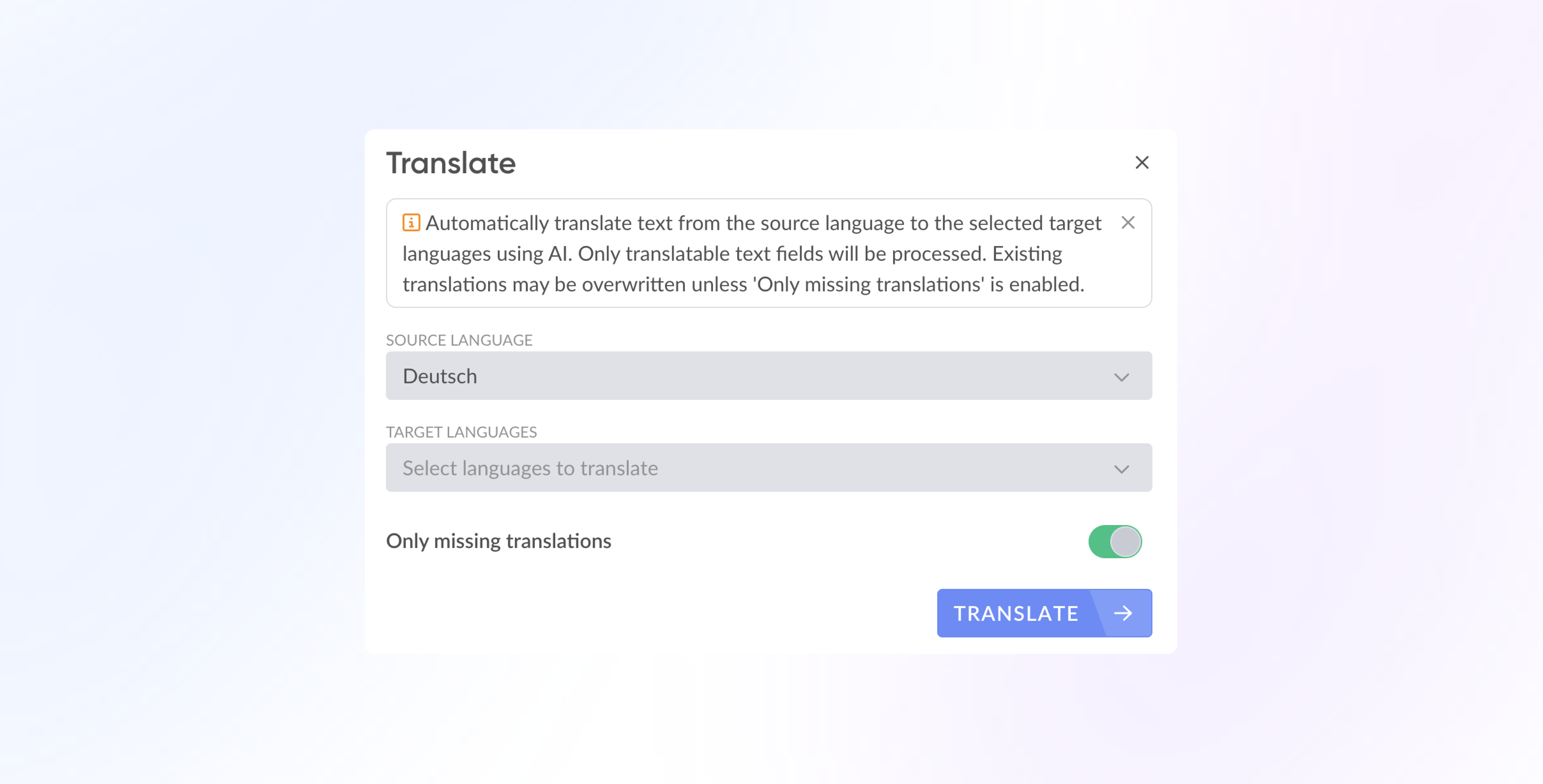 You can now manage translations for your content in a more structured and consistent way across anny. This includes not only **standard fields** but also your **custom fields**, ensuring a fully multilingual experience for your users.
**❓ What it does**
* Allows you to translate all relevant content fields directly in the admin interface.
* Supports translations for custom fields, including labels, descriptions, and placeholder texts.
* Provides a clear language-switching interface so you can edit multiple languages side by side.
* Ensures your booking pages display the correct language based on user selection or browser settings.
Learn more in our Helpcenter article: [https://docs.anny.co/en/articles/445372-how-can-i-translate-content-into-multiple-languages-and-translate-custom-fields](https://docs.anny.co/en/articles/445372-how-can-i-translate-content-into-multiple-languages-and-translate-custom-fields)
## Integration with Shelly Switches
You can now manage translations for your content in a more structured and consistent way across anny. This includes not only **standard fields** but also your **custom fields**, ensuring a fully multilingual experience for your users.
**❓ What it does**
* Allows you to translate all relevant content fields directly in the admin interface.
* Supports translations for custom fields, including labels, descriptions, and placeholder texts.
* Provides a clear language-switching interface so you can edit multiple languages side by side.
* Ensures your booking pages display the correct language based on user selection or browser settings.
Learn more in our Helpcenter article: [https://docs.anny.co/en/articles/445372-how-can-i-translate-content-into-multiple-languages-and-translate-custom-fields](https://docs.anny.co/en/articles/445372-how-can-i-translate-content-into-multiple-languages-and-translate-custom-fields)
## Integration with Shelly Switches
 The new Shelly integration allows you to connect booking activities in anny with your Shelly smart switches. Shelly devices are compact, WiFi-enabled relays installed in the power line of a device (e.g., a lamp) or behind a light switch.
**❓ What it does**
* Links selected anny resources with your Shelly switches.
* Triggers actions on your Shelly devices based on booking activity.
* Supports the following booking-based triggers:
* **Booking starts**
* **Booking ends**
* **Booking checked in**
* **Booking checked out**
**💬 Example**
When a booking starts, a Shelly switch can automatically turn on the lights in the room; when the booking ends, the switch can turn them off, no manual interaction needed.
Learn more here: [https://docs.anny.co/en/articles/410051-shelly-integration](https://docs.anny.co/en/articles/410051-shelly-integration)
## Integration with Tapirx E-Paper Displays
The new Shelly integration allows you to connect booking activities in anny with your Shelly smart switches. Shelly devices are compact, WiFi-enabled relays installed in the power line of a device (e.g., a lamp) or behind a light switch.
**❓ What it does**
* Links selected anny resources with your Shelly switches.
* Triggers actions on your Shelly devices based on booking activity.
* Supports the following booking-based triggers:
* **Booking starts**
* **Booking ends**
* **Booking checked in**
* **Booking checked out**
**💬 Example**
When a booking starts, a Shelly switch can automatically turn on the lights in the room; when the booking ends, the switch can turn them off, no manual interaction needed.
Learn more here: [https://docs.anny.co/en/articles/410051-shelly-integration](https://docs.anny.co/en/articles/410051-shelly-integration)
## Integration with Tapirx E-Paper Displays
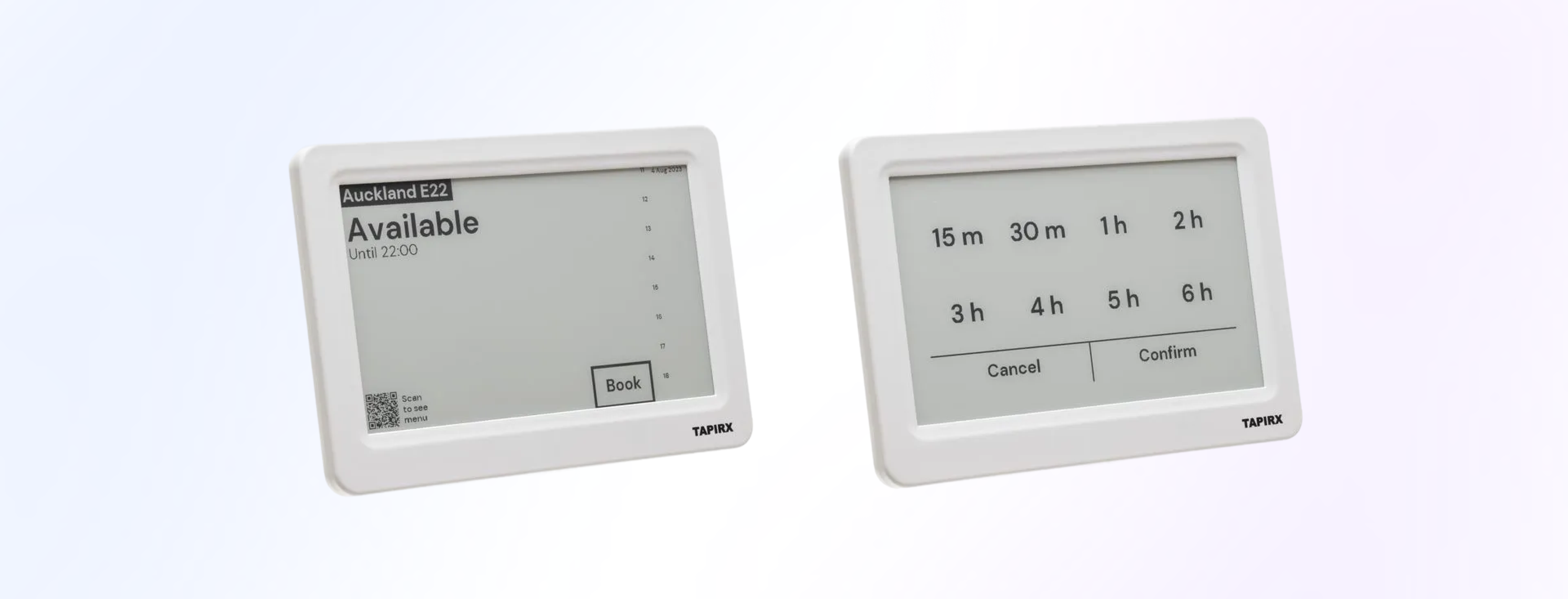 anny now supports a direct integration with **Tapirx E-Paper Displays**, allowing you to link displays to your resources and keep availability information automatically up to date.
**❓ What it does**
* Connects Tapirx E-Paper Displays directly to selected resources in your anny account.
* Automatically updates each linked display with the latest availability and scheduling information.
* Supports the current Tapirx device lineup, including:
* **Tapirx Mini 4.2"**
* **Tapirx Touch 7.5"**
* **Tapirx 7.5"**
* Works with the Tapirx infrastructure for long-lasting, low-maintenance E-ink displays.
**💬 Example**
Link a room resource to a Tapirx display mounted outside the door, the device will show the current availability without any manual updates.
**💡 Interested?**
Fill out this form and we’ll create a non-binding offer for you together with Tapirx: [https://tally.so/r/mDXdkE](https://tally.so/r/mDXdkE)
## Webhooks: Real-time Activity Notifications
anny now supports a direct integration with **Tapirx E-Paper Displays**, allowing you to link displays to your resources and keep availability information automatically up to date.
**❓ What it does**
* Connects Tapirx E-Paper Displays directly to selected resources in your anny account.
* Automatically updates each linked display with the latest availability and scheduling information.
* Supports the current Tapirx device lineup, including:
* **Tapirx Mini 4.2"**
* **Tapirx Touch 7.5"**
* **Tapirx 7.5"**
* Works with the Tapirx infrastructure for long-lasting, low-maintenance E-ink displays.
**💬 Example**
Link a room resource to a Tapirx display mounted outside the door, the device will show the current availability without any manual updates.
**💡 Interested?**
Fill out this form and we’ll create a non-binding offer for you together with Tapirx: [https://tally.so/r/mDXdkE](https://tally.so/r/mDXdkE)
## Webhooks: Real-time Activity Notifications
 With Webhooks, anny can now send real-time notifications to your systems whenever specific events occur.
**❓ What it does**
* Sends an HTTP request to a URL you define whenever selected events happen in anny.
* Supports events across bookings, orders, invoices, and customers, including create, update, and delete actions.
* Allows filtering booking-related events by resources, services, or categories.
* Delivers structured JSON payloads containing event metadata and the affected object.
* Signs each webhook request so you can verify authenticity.
* Stores a delivery history and retries failed deliveries automatically.
**💬 Example**
When a new booking is created, anny immediately sends the booking data to your endpoint, where you can trigger further processing such as notifications or system updates.
Learn more here: [https://docs.anny.co/en/articles/349740-webhooks](https://docs.anny.co/en/articles/349740-webhooks)
## Manage schedules more easily with groups & temporary variants
Managing your schedules is now **much easier**.
With Webhooks, anny can now send real-time notifications to your systems whenever specific events occur.
**❓ What it does**
* Sends an HTTP request to a URL you define whenever selected events happen in anny.
* Supports events across bookings, orders, invoices, and customers, including create, update, and delete actions.
* Allows filtering booking-related events by resources, services, or categories.
* Delivers structured JSON payloads containing event metadata and the affected object.
* Signs each webhook request so you can verify authenticity.
* Stores a delivery history and retries failed deliveries automatically.
**💬 Example**
When a new booking is created, anny immediately sends the booking data to your endpoint, where you can trigger further processing such as notifications or system updates.
Learn more here: [https://docs.anny.co/en/articles/349740-webhooks](https://docs.anny.co/en/articles/349740-webhooks)
## Manage schedules more easily with groups & temporary variants
Managing your schedules is now **much easier**.
With the new features for **schedule groups and temporary schedules**, you can make changes centrally and respond flexibly to temporary differences.
1. **Schedule groups: Central control for multiple resources**
Previously, you had to create and adjust the same schedule for each resource individually.
Now you can **link a schedule to multiple resources** and manage changes centrally.
💡 **Example**:
Your standard opening hours apply to all rooms. When you adjust them in a schedule, they are automatically updated for all linked resources.
2. **Temporary schedules: Set different times for specific periods**
Some periods require special opening hours, such as during the summer months or the holiday season.
With temporary schedules, you can **create additional variants of your standard schedule** that are only active during a specific period.
💡 **Example**:
Your regular opening hours apply throughout the year, but you want to be open longer in the summer. Simply create a seasonal variant for this period, and anny will automatically activate it and then revert back to the standard hours.
## New community management options
👬 Additional settings for communities
Until now, the incognito mode setting was up to the users—now, as an admin, you can specify this. You can choose between:
* All users are incognito
* All users are visible
* All users are incognito by default, but can adjust their settings
* All users are visible by default, but can adjust their settings
We have introduced a role system for communities. You can choose between the following roles:
* Member (can view and book members)
* Observer (can view members but not book them)
* Visitor (can book but not view other members)
These roles can now be set for automatic membership, so every member starts with this role. The role can be adjusted later.
The invitation function has also been upgraded:
* You can now customize the text for an invitation to a community.
* You can now "silently invite" new members, meaning that members are added without receiving any information about it.
If you want to add a member to a community for a specific period of time, simply set a start and end date before inviting the member.
## Individual settings for child resources
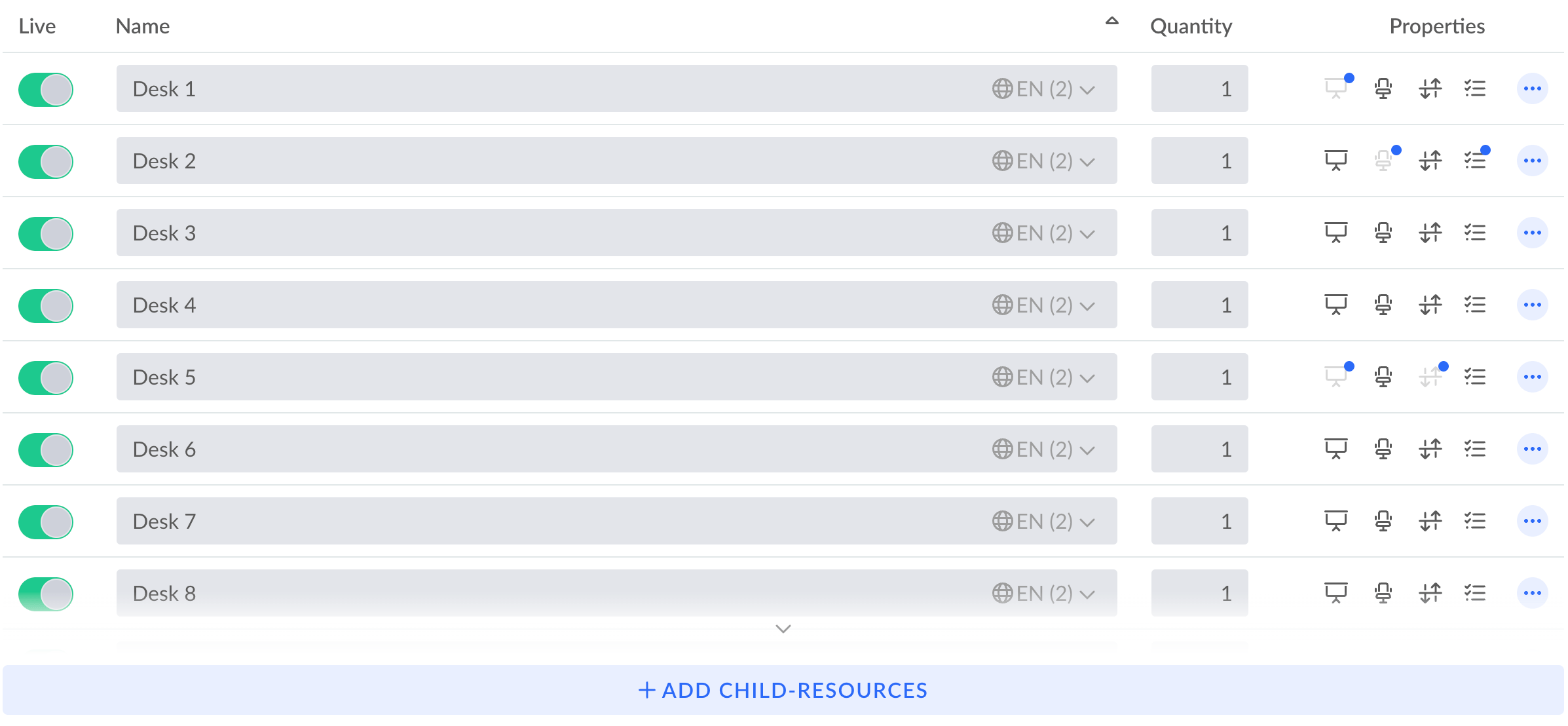
* Child resources can now be deactivated individually
* Properties can now be selected for each child resource
 ## Improved Resource Calendar Overview
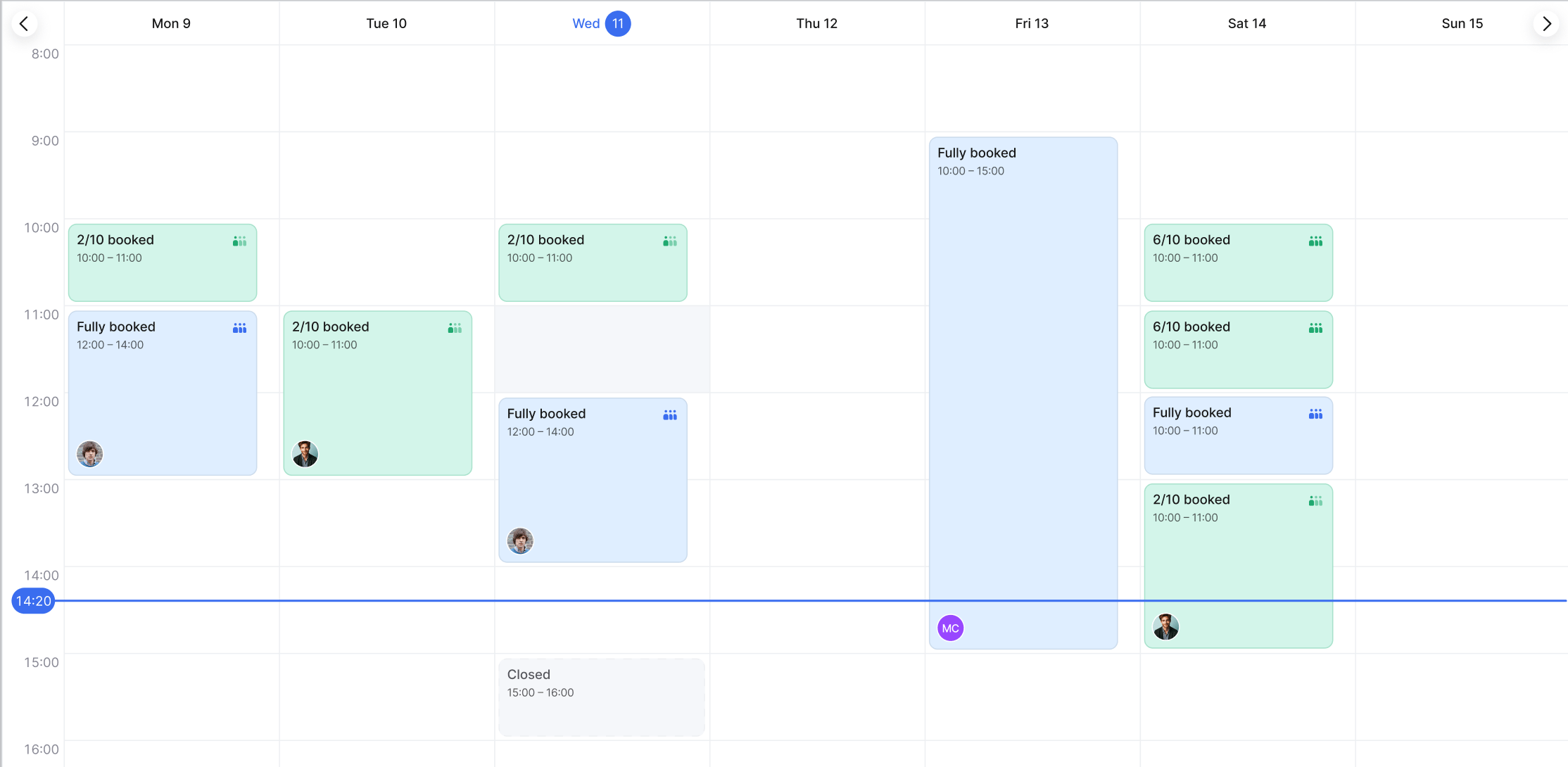
* **Optimized Child Resource Calendar View:** Now you can see more child resources at a glance without needing to scroll.
* **Enhanced Visibility:** Improved layout provides a clearer overview of the availability of child resources.
* **Week View for Resources:** Plan and organize with an expanded weekly perspective for each resource.
* **Full Screen Calendar Display:** Dive into a comprehensive full screen view for detailed scheduling.
* **Refined Color Coding:** Quickly discern the availability of resources with an optimized color scheme.
* **Participant Display on Booking Slots:** Easily view all participants directly within each booking slot.
## Improved Resource Calendar Overview
* **Optimized Child Resource Calendar View:** Now you can see more child resources at a glance without needing to scroll.
* **Enhanced Visibility:** Improved layout provides a clearer overview of the availability of child resources.
* **Week View for Resources:** Plan and organize with an expanded weekly perspective for each resource.
* **Full Screen Calendar Display:** Dive into a comprehensive full screen view for detailed scheduling.
* **Refined Color Coding:** Quickly discern the availability of resources with an optimized color scheme.
* **Participant Display on Booking Slots:** Easily view all participants directly within each booking slot.
 ## New Filters to find people in the office
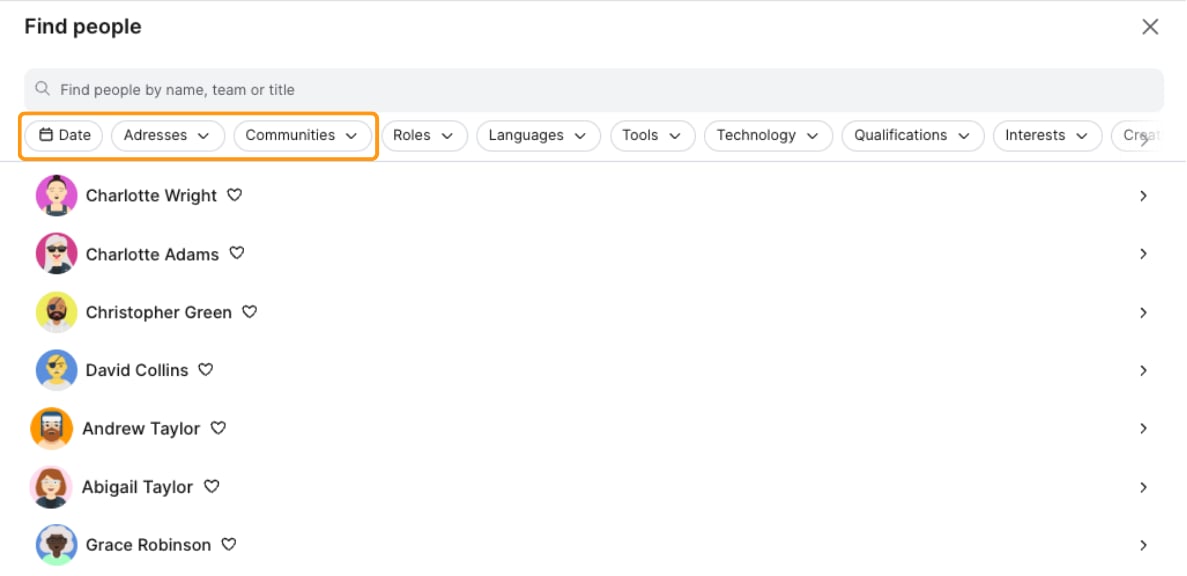
We've enhanced our search functionality with the introduction of additional filters to help you find people more effectively. You can now refine your searches by applying filters for Dates, Addresses, and Communities, making it easier and faster to locate the person you are searching for.
## New Filters to find people in the office
We've enhanced our search functionality with the introduction of additional filters to help you find people more effectively. You can now refine your searches by applying filters for Dates, Addresses, and Communities, making it easier and faster to locate the person you are searching for.
 ## Filtered and column-based exports
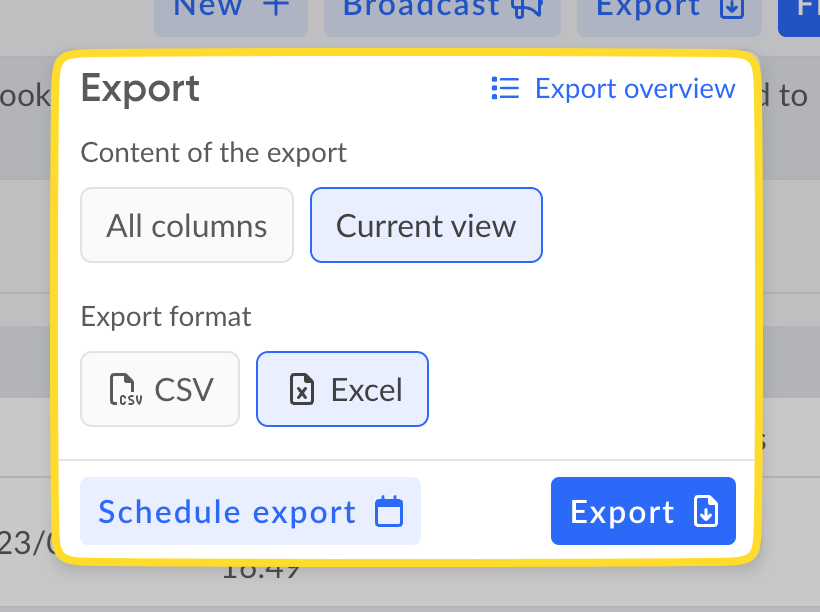
* The current view can now also be filtered, meaning that all currently selected columns and filters are taken into account during export.
* Columns can now also be configured for automatic exports.
## Filtered and column-based exports
* The current view can now also be filtered, meaning that all currently selected columns and filters are taken into account during export.
* Columns can now also be configured for automatic exports.
 ## New Smart lock integrations: Comydo und Dormakaba Resivo
We are pleased to announce an expansion of our smart lock integrations with the addition of a new provider, **Comydo**. This partnership is part of our ongoing effort to broaden the range of options available to our customers, ensuring greater flexibility and security in access solutions.
Furthermore, we are excited to reveal that our Dormakaba family has grown. You now have the capability to integrate **Dormakaba Resivo** locks with your existing resources.
## New Smart lock integrations: Comydo und Dormakaba Resivo
We are pleased to announce an expansion of our smart lock integrations with the addition of a new provider, **Comydo**. This partnership is part of our ongoing effort to broaden the range of options available to our customers, ensuring greater flexibility and security in access solutions.
Furthermore, we are excited to reveal that our Dormakaba family has grown. You now have the capability to integrate **Dormakaba Resivo** locks with your existing resources.
 ## Map Designer 2.0 with enhanced features
The Map Designer got some updates for an enhanced usability.
What's new?
🧑💻 Better UX: you can now design your maps in full screen, the allocation of resources has been significantly simplified, and you can now search for (child) resources
⛓️💥 There is now a snapping mode that makes designing the map much easier
🚪You can now insert doors and windows
📋 There are now many more templates, and you can save your own templates and use them organization-wide
💬 You can now also add text elements
🙂 We have significantly expanded the selection of icons
## Innovative power features for your anny check-in app ✨
With our check-in app, we have already set new standards for smooth entry this year. But we wouldn't be anny if we rested on our laurels! That's why we've added some new features to our check-in app, which we'd like to introduce to you today.
### 🚦New settings for check-ins and appointment bookings at the terminal
You can choose not to link check-in, registration, and check-out to the opening hours of your resources. You can also decide whether users can check in only one or all of your organization's resources at the terminal and can specifically disable spontaneous booking for individual resources.
### 💳 Check-in and registration with customer pass
Make it even easier for your loyal users! From now on, your users can check in not only with the booking QR code, but also directly with the QR code on their customer card or from the anny app.
### 🔒 No-Interaction Mode
This mode is ideal for terminals without touch displays and offers additional security. When activated, interaction with the screen is completely disabled. Your users can then authenticate themselves only by scanning their QR code. This prevents unauthorized entries and ensures a clear, secure process.
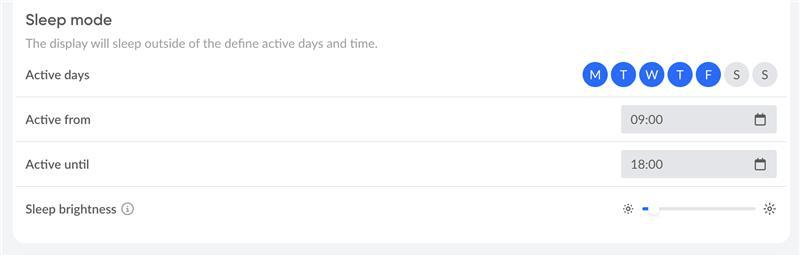
### 😴 Sleep mode
Reduce energy consumption and lower your operating expenses. Set fixed times when the display automatically dims—for example, at night or on weekends.
## Map Designer 2.0 with enhanced features
The Map Designer got some updates for an enhanced usability.
What's new?
🧑💻 Better UX: you can now design your maps in full screen, the allocation of resources has been significantly simplified, and you can now search for (child) resources
⛓️💥 There is now a snapping mode that makes designing the map much easier
🚪You can now insert doors and windows
📋 There are now many more templates, and you can save your own templates and use them organization-wide
💬 You can now also add text elements
🙂 We have significantly expanded the selection of icons
## Innovative power features for your anny check-in app ✨
With our check-in app, we have already set new standards for smooth entry this year. But we wouldn't be anny if we rested on our laurels! That's why we've added some new features to our check-in app, which we'd like to introduce to you today.
### 🚦New settings for check-ins and appointment bookings at the terminal
You can choose not to link check-in, registration, and check-out to the opening hours of your resources. You can also decide whether users can check in only one or all of your organization's resources at the terminal and can specifically disable spontaneous booking for individual resources.
### 💳 Check-in and registration with customer pass
Make it even easier for your loyal users! From now on, your users can check in not only with the booking QR code, but also directly with the QR code on their customer card or from the anny app.
### 🔒 No-Interaction Mode
This mode is ideal for terminals without touch displays and offers additional security. When activated, interaction with the screen is completely disabled. Your users can then authenticate themselves only by scanning their QR code. This prevents unauthorized entries and ensures a clear, secure process.
### 😴 Sleep mode
Reduce energy consumption and lower your operating expenses. Set fixed times when the display automatically dims—for example, at night or on weekends.
 ### ⛔️ Out-of-order mode
Want to temporarily close the terminal for bookings and check-ins? Manually set it to “Out of service” and leave a custom message for your users so everyone knows.
The new features are already available for you! Take a look at the settings on your check-in displays and customize everything to your liking: [https://app.anny.co/displays?type=check-in](https://app.anny.co/displays?type=check-in)
## The new Microsoft Teams app is there
The new anny Teams app is available! In addition to a new look and feel, the Teams app now has a new user interface and an automatic login feature with your Microsoft 365 account.
### Automatic login
For automatic login, the Teams app asks each user once for authorization to read out the active user. This is followed by a confirmation screen.
**Tip:** As an admin, you can assign the authorization for all users of the organization so that this does not have to be done individually. If it is deactivated in Entra that users can independently assign an app consent, it is necessary for the new Teams app to be activated once by the administrator.
The new update is available automatically. If you are not yet using the Teams app, you can find a short guide [here](https://docs.anny.co/en/articles/115390-how-do-i-add-the-anny-ms-teams-app).
## 📤 Let your users upload documents
Have you ever had to chase after important documents? From now on, your users can upload the necessary files directly when making a booking.
Whether it's proof of identity, required images, or an application form, everything is stored directly and securely in the respective booking, saving you time. The advantage for you is that all the necessary documents are immediately where they belong, without the need for extra emails.
Simply use the new “File” field in the forms. Here you also have various setting options, such as permitted file types, maximum size, and number of files to be uploaded.
## The waiting list for your resources 📋
Is the desired seminar already fully booked, or is your course already filled? The best dates often sell out quickly. With anny's newest feature—the **waiting list**—cancellation is no longer a hassle but rather an opportunity!
With the new waiting list function, you enable your users to simply put themselves on a waiting list when resources are fully booked. As soon as a place becomes available again - for example, due to a cancellation - the interested parties on the waiting list are automatically notified by email. This way, no spots remain empty, and your users can look forward to one of the coveted spots.
**Your advantages at a glance**
* Maximum utilization: Automatically fill gaps caused by cancellations. This applies to both your paid resources and free offers.
* Happier users: Reduce frustration when appointments are fully booked and offer your users a second chance.
* Fully automatic: Once activated, anny takes care of everything. No manual effort for you.
**How does this work for your users? It's very simple!**
1. If a desired resource is fully booked at the desired time, your users will see the “Add to waiting list” button.
2. They can register with one click.
3. If the space becomes available again, the person will automatically receive a notification and can book the appointment directly.
## ᝰ.ᐟ Have legal documents confirmed directly
In addition to file uploads, you can now also have important documents such as consent forms or disclaimers confirmed directly during the booking process – via a simple checkbox or legally binding digital signature:
1. Confirmation via checkbox: Perfect for simple consent. Your users simply tick a box to confirm that they have read and understood the document.
2. Confirmation via digital signature: always the right choice when you need an explicit and legally binding signature. Your users can sign directly at checkout on their smartphone or computer.
The confirmed document is automatically and securely stored in the respective booking and in the customer file. This means you always have everything in one place and at your fingertips.
**Your advantage: less effort, more security**
* **Efficient:** No more manual sending of documents.
* **User-friendly:** A smooth and completely digital process for your customers in anny.
* **Legally compliant:** Receive necessary confirmations in a verifiable and digitally documented form.
You are welcome to check out our Help Center article: [https://docs.anny.co/en/articles/342201-confirming-legal-documents-during-booking](https://docs.anny.co/en/articles/342201-confirming-legal-documents-during-booking)
## The new anny is live 🥳
The wait is over: the new anny is here!
We are very excited about this milestone and are looking forward to finally sharing all the new features with you. Even though some things have changed, our mission remains the same: We want to help you share and use all resources as easily and efficiently as possible - and that's exactly what we've improved even further with this update.
We have summarized the most important questions and answers about the launch in [this help center article](https://docs.anny.co/en/articles/302455-faq-the-new-anny).
### ⛔️ Out-of-order mode
Want to temporarily close the terminal for bookings and check-ins? Manually set it to “Out of service” and leave a custom message for your users so everyone knows.
The new features are already available for you! Take a look at the settings on your check-in displays and customize everything to your liking: [https://app.anny.co/displays?type=check-in](https://app.anny.co/displays?type=check-in)
## The new Microsoft Teams app is there
The new anny Teams app is available! In addition to a new look and feel, the Teams app now has a new user interface and an automatic login feature with your Microsoft 365 account.
### Automatic login
For automatic login, the Teams app asks each user once for authorization to read out the active user. This is followed by a confirmation screen.
**Tip:** As an admin, you can assign the authorization for all users of the organization so that this does not have to be done individually. If it is deactivated in Entra that users can independently assign an app consent, it is necessary for the new Teams app to be activated once by the administrator.
The new update is available automatically. If you are not yet using the Teams app, you can find a short guide [here](https://docs.anny.co/en/articles/115390-how-do-i-add-the-anny-ms-teams-app).
## 📤 Let your users upload documents
Have you ever had to chase after important documents? From now on, your users can upload the necessary files directly when making a booking.
Whether it's proof of identity, required images, or an application form, everything is stored directly and securely in the respective booking, saving you time. The advantage for you is that all the necessary documents are immediately where they belong, without the need for extra emails.
Simply use the new “File” field in the forms. Here you also have various setting options, such as permitted file types, maximum size, and number of files to be uploaded.
## The waiting list for your resources 📋
Is the desired seminar already fully booked, or is your course already filled? The best dates often sell out quickly. With anny's newest feature—the **waiting list**—cancellation is no longer a hassle but rather an opportunity!
With the new waiting list function, you enable your users to simply put themselves on a waiting list when resources are fully booked. As soon as a place becomes available again - for example, due to a cancellation - the interested parties on the waiting list are automatically notified by email. This way, no spots remain empty, and your users can look forward to one of the coveted spots.
**Your advantages at a glance**
* Maximum utilization: Automatically fill gaps caused by cancellations. This applies to both your paid resources and free offers.
* Happier users: Reduce frustration when appointments are fully booked and offer your users a second chance.
* Fully automatic: Once activated, anny takes care of everything. No manual effort for you.
**How does this work for your users? It's very simple!**
1. If a desired resource is fully booked at the desired time, your users will see the “Add to waiting list” button.
2. They can register with one click.
3. If the space becomes available again, the person will automatically receive a notification and can book the appointment directly.
## ᝰ.ᐟ Have legal documents confirmed directly
In addition to file uploads, you can now also have important documents such as consent forms or disclaimers confirmed directly during the booking process – via a simple checkbox or legally binding digital signature:
1. Confirmation via checkbox: Perfect for simple consent. Your users simply tick a box to confirm that they have read and understood the document.
2. Confirmation via digital signature: always the right choice when you need an explicit and legally binding signature. Your users can sign directly at checkout on their smartphone or computer.
The confirmed document is automatically and securely stored in the respective booking and in the customer file. This means you always have everything in one place and at your fingertips.
**Your advantage: less effort, more security**
* **Efficient:** No more manual sending of documents.
* **User-friendly:** A smooth and completely digital process for your customers in anny.
* **Legally compliant:** Receive necessary confirmations in a verifiable and digitally documented form.
You are welcome to check out our Help Center article: [https://docs.anny.co/en/articles/342201-confirming-legal-documents-during-booking](https://docs.anny.co/en/articles/342201-confirming-legal-documents-during-booking)
## The new anny is live 🥳
The wait is over: the new anny is here!
We are very excited about this milestone and are looking forward to finally sharing all the new features with you. Even though some things have changed, our mission remains the same: We want to help you share and use all resources as easily and efficiently as possible - and that's exactly what we've improved even further with this update.
We have summarized the most important questions and answers about the launch in [this help center article](https://docs.anny.co/en/articles/302455-faq-the-new-anny).
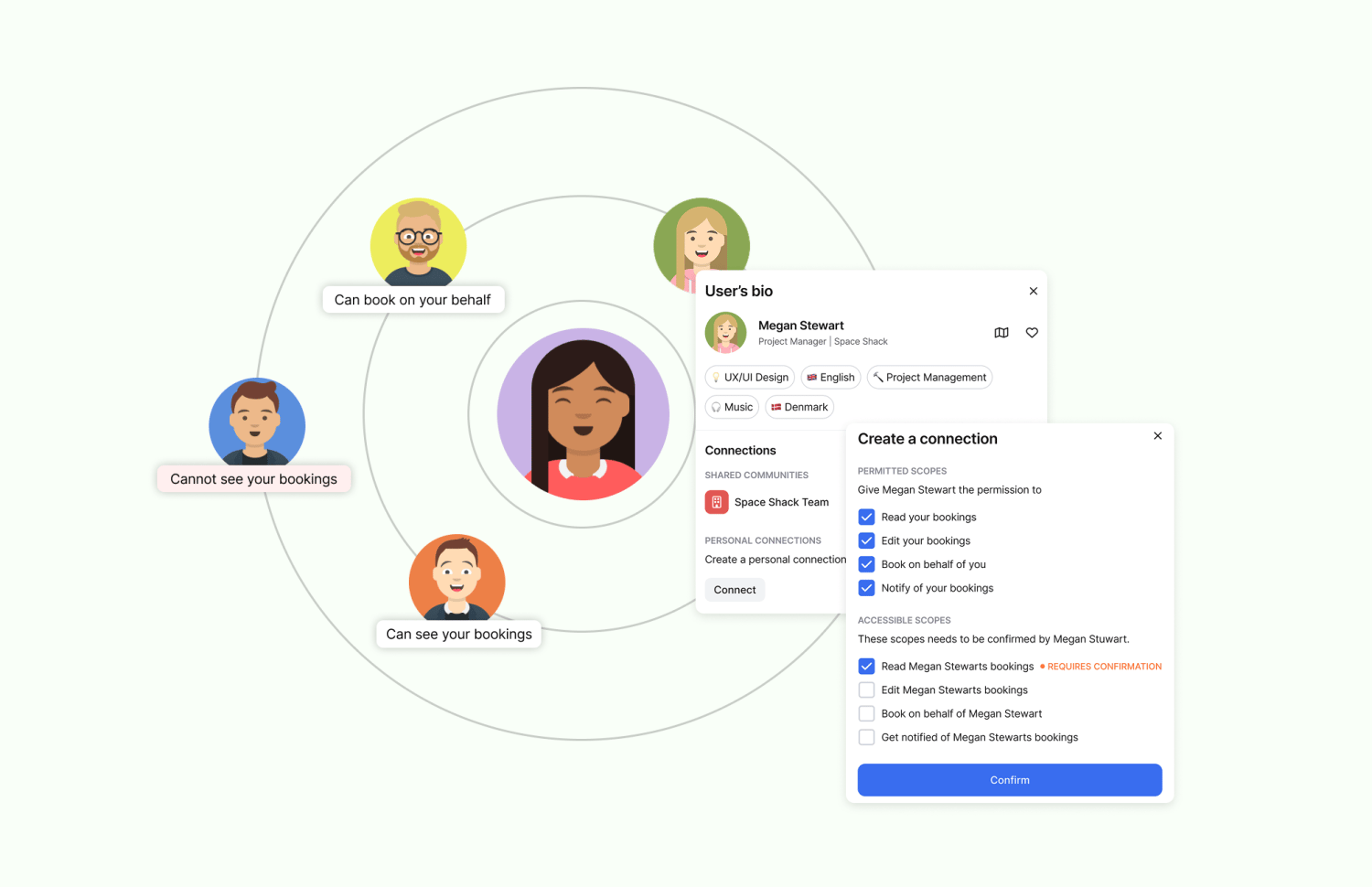 ### **New: Connected Persons & Book-on-behalf**
Connected Persons allows you to connect directly with other people and assign individual authorizations:
* **Read bookings -** View the bookings of others and thus reduce the coordination effort.
* **Book-on-behalf -** Make bookings on behalf of other people. Perfect for teams, assistant roles, and shared resources.
* **Edit bookings -** You can cancel the bookings of other users. This allows you to put your entire booking management in the hands of others.
* \*\*Notify about bookings -\*\*Receive a notification as soon as a booking is made by a person connected to you. This way you can ensure that you don't miss any important changes and can react to them.
All authorizations can be requested or released individually. To do this, a request is sent between the people (peer-to-peer) directly from the user bio or the profile settings. The connections cannot be controlled externally (e.g. by admins).
### **New: Connected Persons & Book-on-behalf**
Connected Persons allows you to connect directly with other people and assign individual authorizations:
* **Read bookings -** View the bookings of others and thus reduce the coordination effort.
* **Book-on-behalf -** Make bookings on behalf of other people. Perfect for teams, assistant roles, and shared resources.
* **Edit bookings -** You can cancel the bookings of other users. This allows you to put your entire booking management in the hands of others.
* \*\*Notify about bookings -\*\*Receive a notification as soon as a booking is made by a person connected to you. This way you can ensure that you don't miss any important changes and can react to them.
All authorizations can be requested or released individually. To do this, a request is sent between the people (peer-to-peer) directly from the user bio or the profile settings. The connections cannot be controlled externally (e.g. by admins).
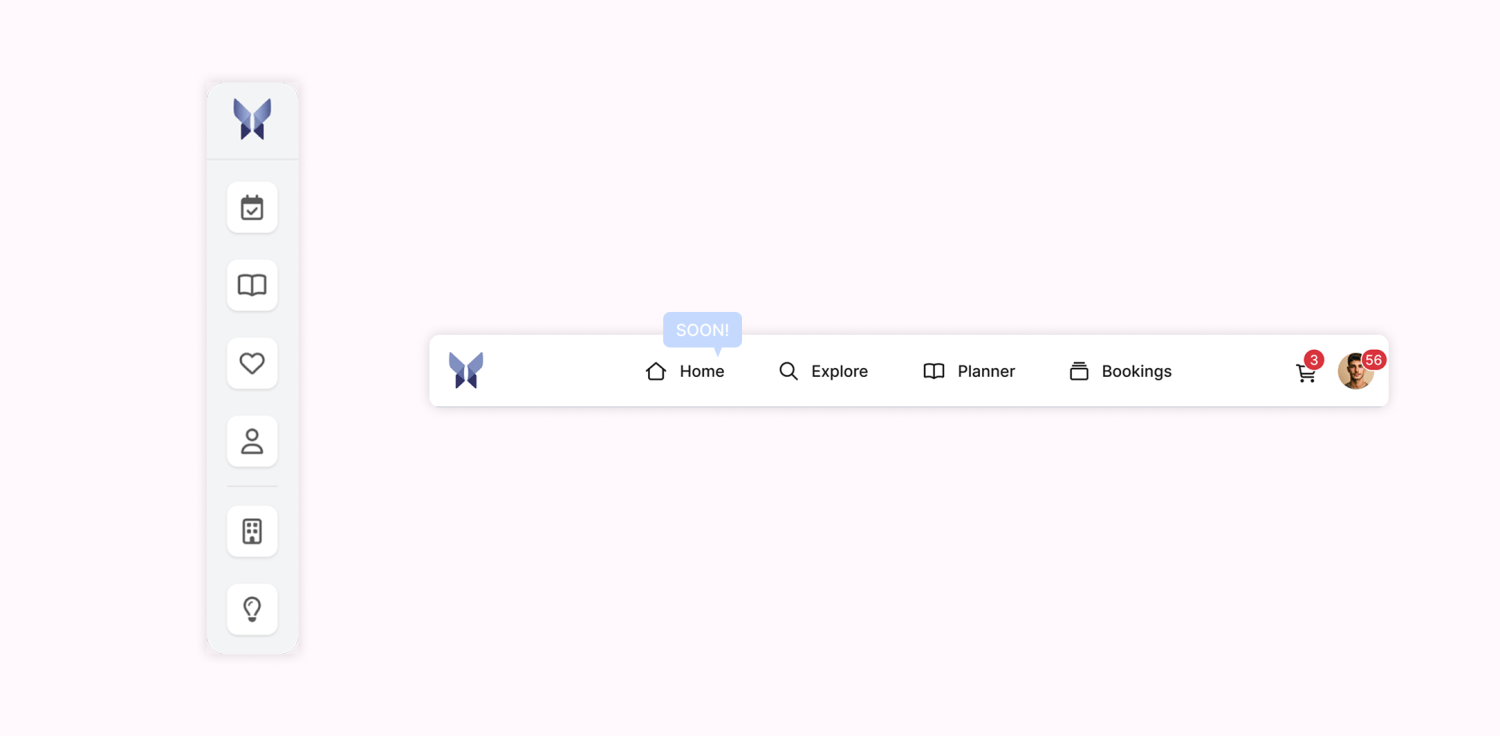 ### **Simplified navigation**
We have restructured the navigation to give you a better overview of our platform so that you can find the functions you want even more easily.
The most important changes at a glance:
* **Navigation in the header -** The main navigation is now at the top of the header, providing a clearer structure and a better overview.
* **Explore -** All resources from your communities can now be found centrally on the new Explore Page, whereby individual community pages and their navigation points have been removed. You can also set a filter for communities on the Explore page. You can find more information on this in the next section.
* **Planner -** The weekly planner can be accessed as usual under the new menu item ‘Planner’. The separate favorites page is no longer available; instead, favorites can be managed directly in the planner and via the homepage (soon).
* **Profile -** You can now access your profile settings and notifications via your avatar in the top right-hand corner.
* **Homepage (soon) -** You can also look forward to a new homepage with a customized overview of your upcoming bookings.
### **Simplified navigation**
We have restructured the navigation to give you a better overview of our platform so that you can find the functions you want even more easily.
The most important changes at a glance:
* **Navigation in the header -** The main navigation is now at the top of the header, providing a clearer structure and a better overview.
* **Explore -** All resources from your communities can now be found centrally on the new Explore Page, whereby individual community pages and their navigation points have been removed. You can also set a filter for communities on the Explore page. You can find more information on this in the next section.
* **Planner -** The weekly planner can be accessed as usual under the new menu item ‘Planner’. The separate favorites page is no longer available; instead, favorites can be managed directly in the planner and via the homepage (soon).
* **Profile -** You can now access your profile settings and notifications via your avatar in the top right-hand corner.
* **Homepage (soon) -** You can also look forward to a new homepage with a customized overview of your upcoming bookings.
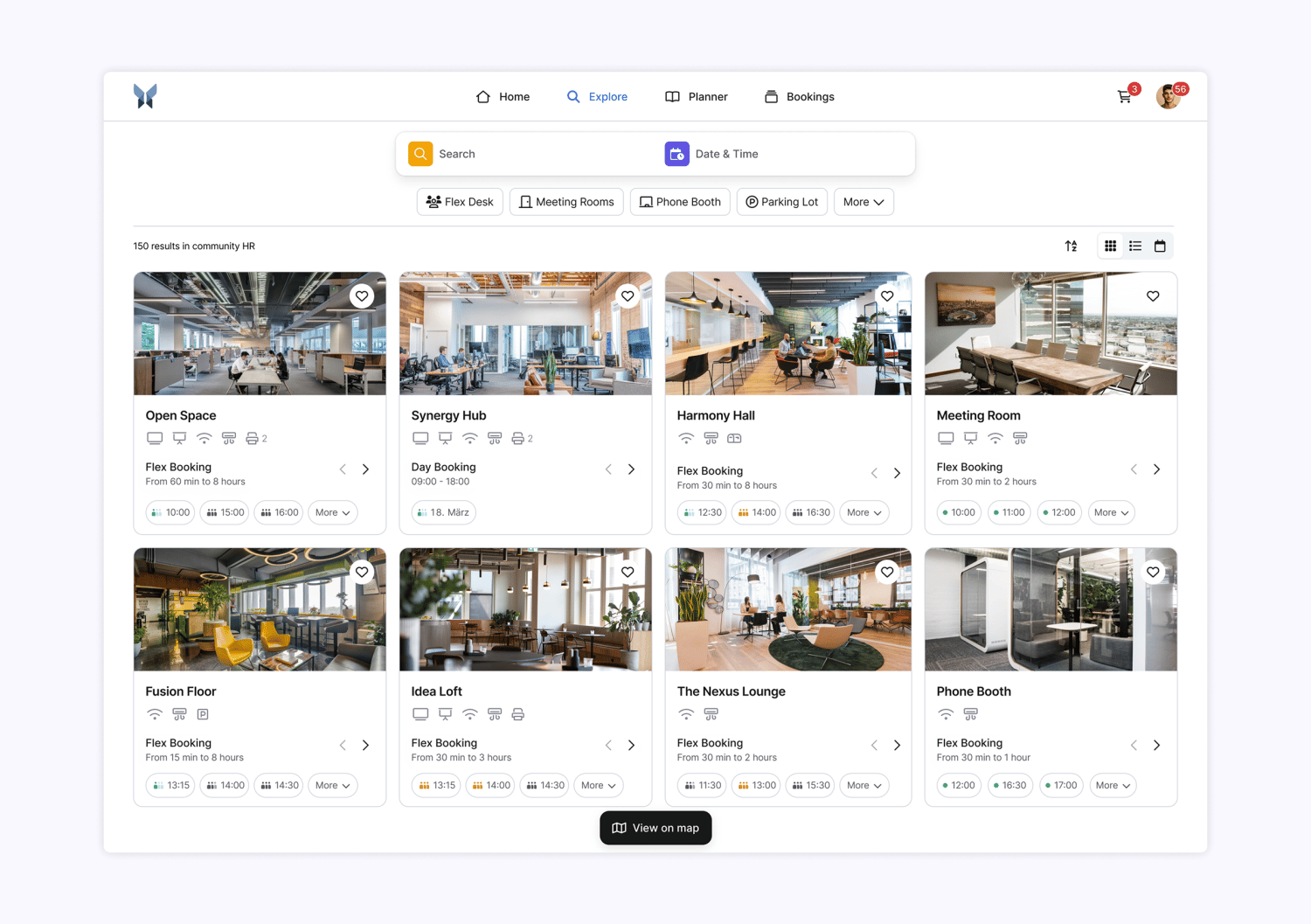 ### **New: Explore page for a centralized overview**
Another new feature is the Explore page - your central location for quick and easy bookings. Instead of switching between individual communities, you will now find all resources ( approved for you) bundled on one page for the first time.
The most important facts at a glance:
* **A central overview -** Search and filter all bookable resources from your communities.
* **Existing community links remain** - they automatically redirect to the new Explore page. Resources can also be filtered by community here.
* **Precise search with location & property filters -** Advanced property filters allow you to search better and faster. Locations and addresses can also be filtered in the search bar. The option to filter by individual groups has been removed.
* **Smarter period search -** Find the right resource in no time at all, simply enter a desired duration (e.g. ‘30 minutes between 1 pm and 3 pm’) and the system will show you available slots.
* \*\*Sharing made easy -\*\*Filter settings such as category, location, community, or properties are saved directly in the URL so that you can easily share a predefined search or call it up again later.
* **Occupation indicator -** The new occupation indicator shows you directly which resources are available or heavily booked at which times - allowing you to better plan your bookings.
### **New: Explore page for a centralized overview**
Another new feature is the Explore page - your central location for quick and easy bookings. Instead of switching between individual communities, you will now find all resources ( approved for you) bundled on one page for the first time.
The most important facts at a glance:
* **A central overview -** Search and filter all bookable resources from your communities.
* **Existing community links remain** - they automatically redirect to the new Explore page. Resources can also be filtered by community here.
* **Precise search with location & property filters -** Advanced property filters allow you to search better and faster. Locations and addresses can also be filtered in the search bar. The option to filter by individual groups has been removed.
* **Smarter period search -** Find the right resource in no time at all, simply enter a desired duration (e.g. ‘30 minutes between 1 pm and 3 pm’) and the system will show you available slots.
* \*\*Sharing made easy -\*\*Filter settings such as category, location, community, or properties are saved directly in the URL so that you can easily share a predefined search or call it up again later.
* **Occupation indicator -** The new occupation indicator shows you directly which resources are available or heavily booked at which times - allowing you to better plan your bookings.
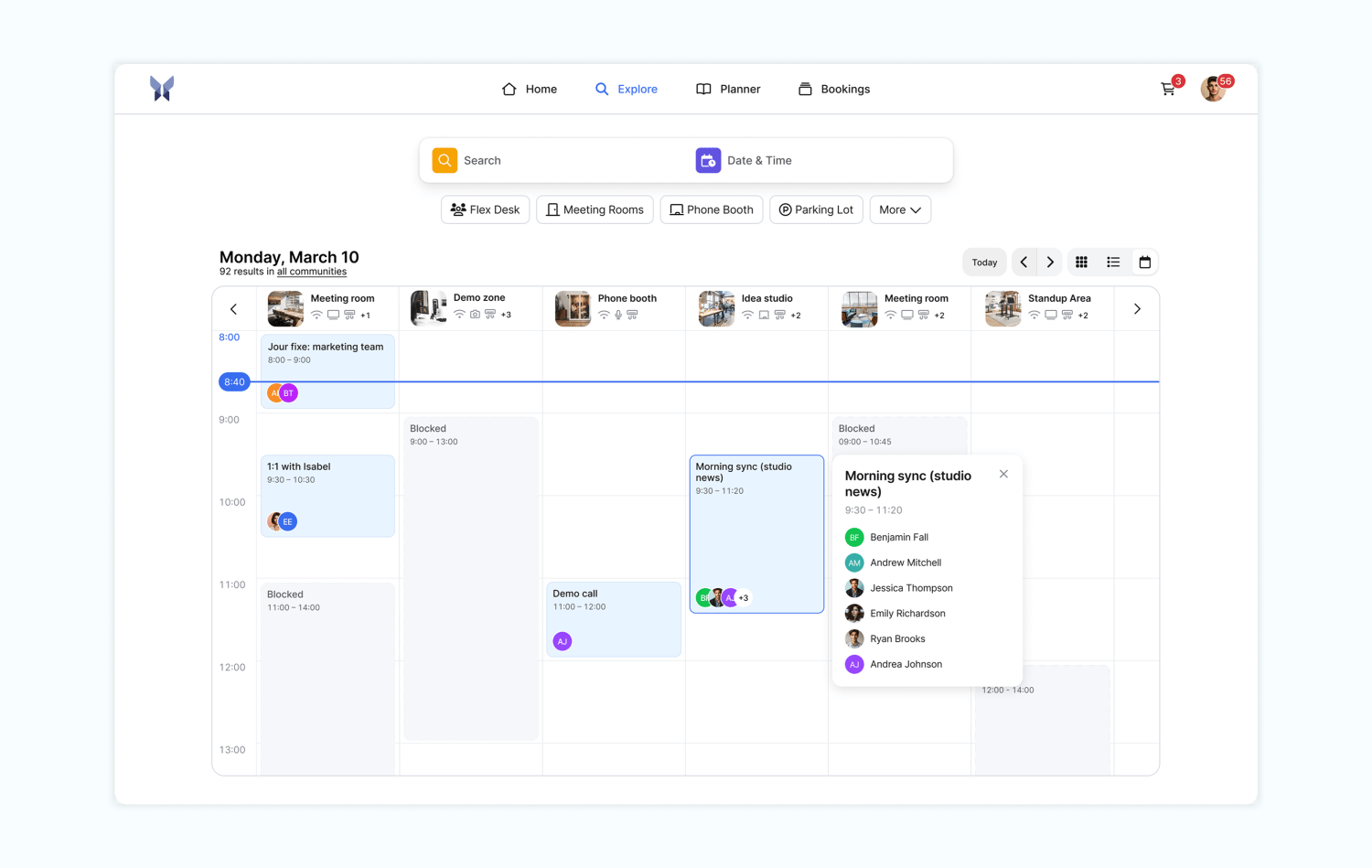 ### **Calendar**
The new calendar view makes planning your booking times and resources even easier. With a clearer structure and more details, you can find free resources without any detours. The calendar is accessible via the Discover, Organization, and Resources pages.
The most important changes at a glance:
* **New calendar view -** you can see at a glance when which resources are free. The visual overview of availabilities allows you to quickly find a suitable time even if you don't yet know exactly when you want to book. This makes your planning flexible.
* **Visible booking title -** See the details of the booking and the person making the booking in the calendar, provided you have the appropriate authorization. This gives you all the information you need immediately and helps you plan better.
* **Full screen view -** The calendar can be expanded to full screen, giving you a clear overview of a larger number of resources and making it easier to navigate through the calendar.
* **Child resources are directly visible -** On the resources page, all connected child resources are displayed in the calendar - for an improved overview of possible booking times.
* **Interactivity (coming soon) -** Soon you will be able to make bookings interactively in the calendar.
### **Calendar**
The new calendar view makes planning your booking times and resources even easier. With a clearer structure and more details, you can find free resources without any detours. The calendar is accessible via the Discover, Organization, and Resources pages.
The most important changes at a glance:
* **New calendar view -** you can see at a glance when which resources are free. The visual overview of availabilities allows you to quickly find a suitable time even if you don't yet know exactly when you want to book. This makes your planning flexible.
* **Visible booking title -** See the details of the booking and the person making the booking in the calendar, provided you have the appropriate authorization. This gives you all the information you need immediately and helps you plan better.
* **Full screen view -** The calendar can be expanded to full screen, giving you a clear overview of a larger number of resources and making it easier to navigate through the calendar.
* **Child resources are directly visible -** On the resources page, all connected child resources are displayed in the calendar - for an improved overview of possible booking times.
* **Interactivity (coming soon) -** Soon you will be able to make bookings interactively in the calendar.
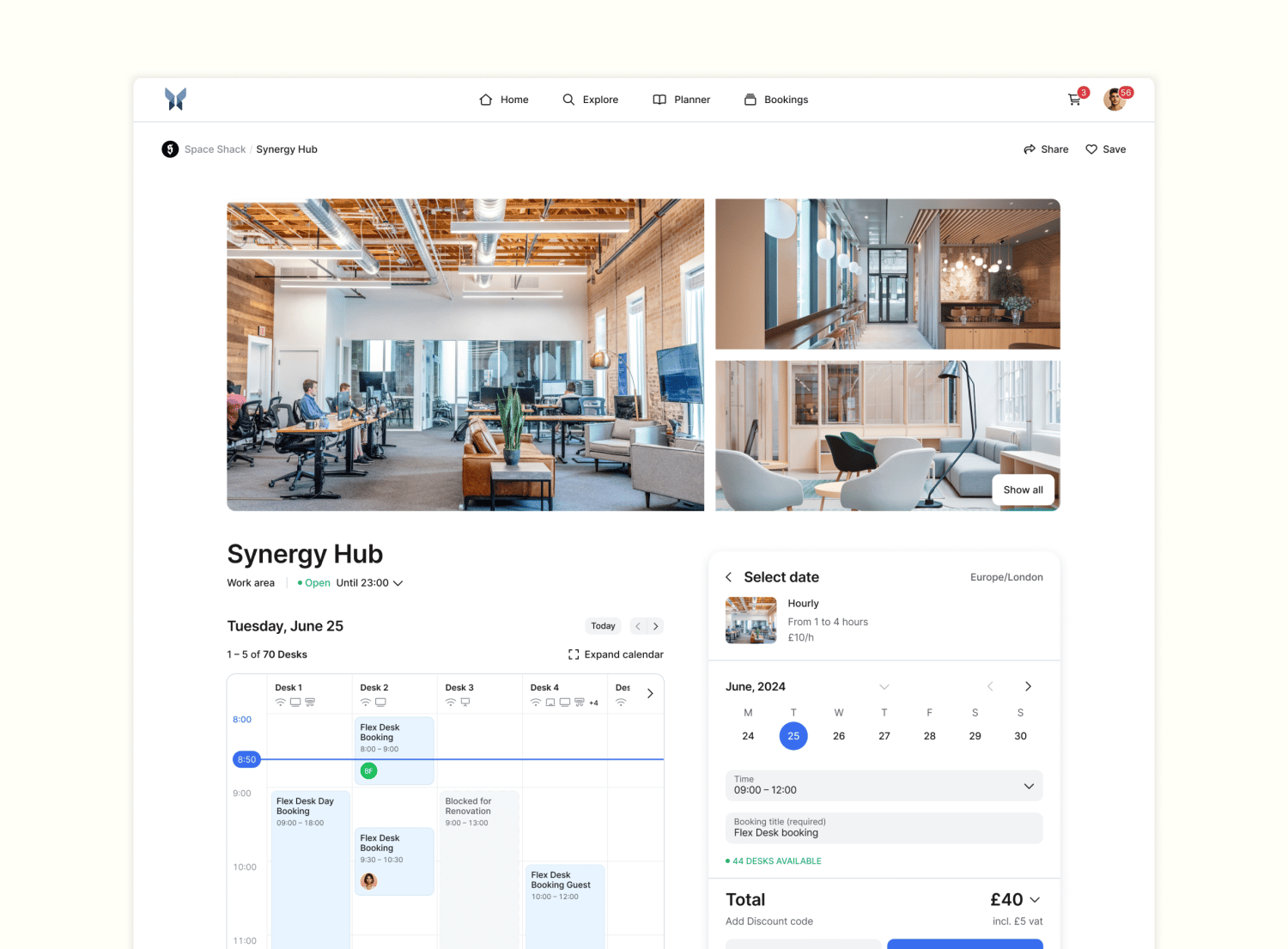 ### **Resources page**
The Resources page and the booking interface have been improved so that you can find what you're looking for even faster and make your bookings with ease.
The most important changes at a glance:
* **Optimized booking interface -** The selection of add-ons and the entire booking process are now even clearer.
* **New image gallery -** See more images at a glance: Instead of one large image, 3 images are now displayed and you can view a full-screen gallery.
* **New look for quotas -** The display of quotas has been optimized and is now more clearly structured.
### **Resources page**
The Resources page and the booking interface have been improved so that you can find what you're looking for even faster and make your bookings with ease.
The most important changes at a glance:
* **Optimized booking interface -** The selection of add-ons and the entire booking process are now even clearer.
* **New image gallery -** See more images at a glance: Instead of one large image, 3 images are now displayed and you can view a full-screen gallery.
* **New look for quotas -** The display of quotas has been optimized and is now more clearly structured.
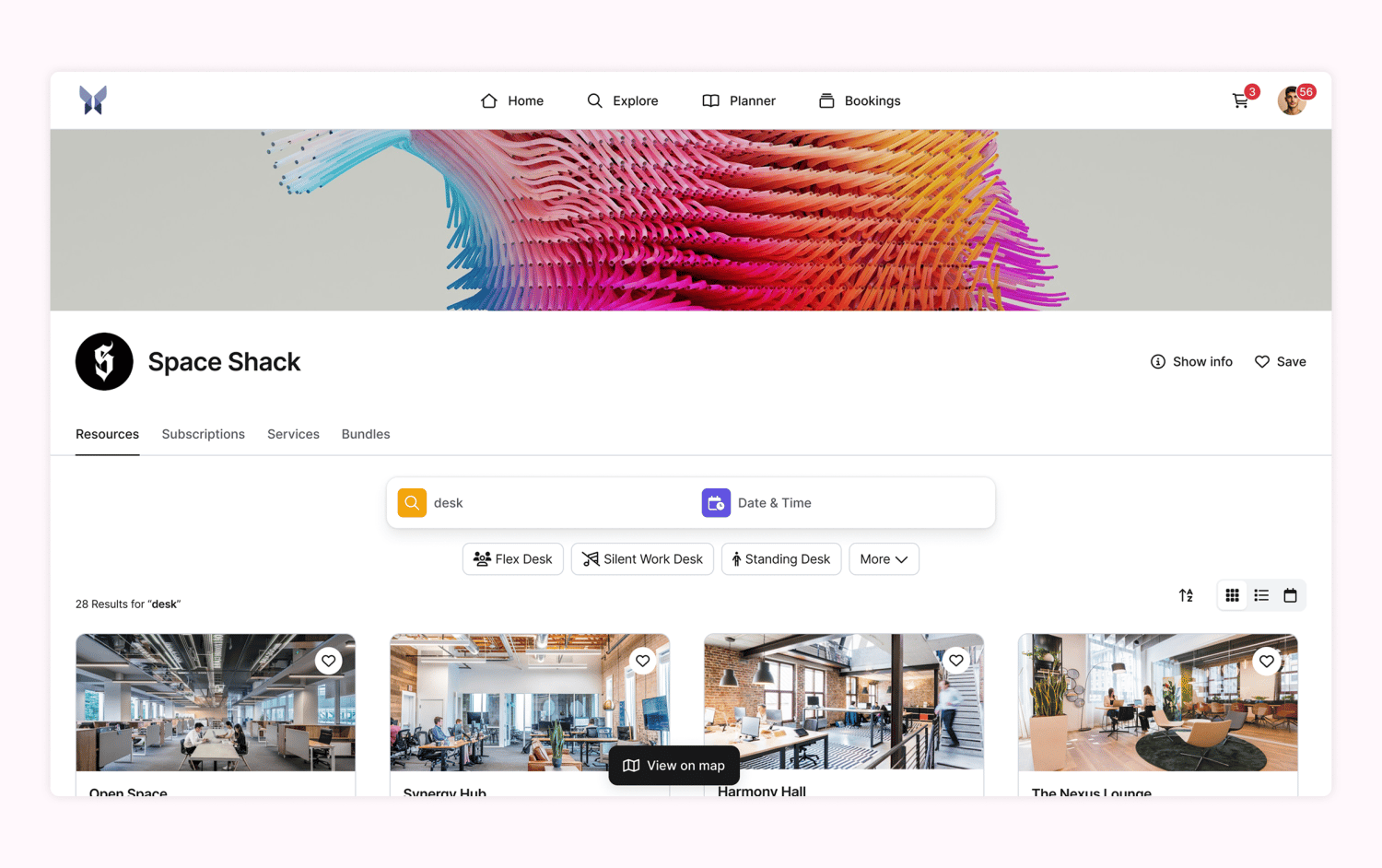 ### **Organization page**
The organization page has also received an upgrade: New filter options and a revised design make your range of resources clearer and more dynamic.
The most important new features at a glance:
* \*\*New filter & search function -\*\*Find resources more easily - The function is similar to the new Explore page.
* **All shared resources visible -** In addition to public resources, you can now also see all resources that you have access to via your communities.
* **Modern design for services, subscriptions & packages -** All pages have been visually improved and are now more clearly structured for a more pleasant booking experience.
* **Links to subscription & package pages -** Subscriptions and booking packages now have their own pages with direct links that can be redirected to ensure easy finding and quick booking.
### **Organization page**
The organization page has also received an upgrade: New filter options and a revised design make your range of resources clearer and more dynamic.
The most important new features at a glance:
* \*\*New filter & search function -\*\*Find resources more easily - The function is similar to the new Explore page.
* **All shared resources visible -** In addition to public resources, you can now also see all resources that you have access to via your communities.
* **Modern design for services, subscriptions & packages -** All pages have been visually improved and are now more clearly structured for a more pleasant booking experience.
* **Links to subscription & package pages -** Subscriptions and booking packages now have their own pages with direct links that can be redirected to ensure easy finding and quick booking.
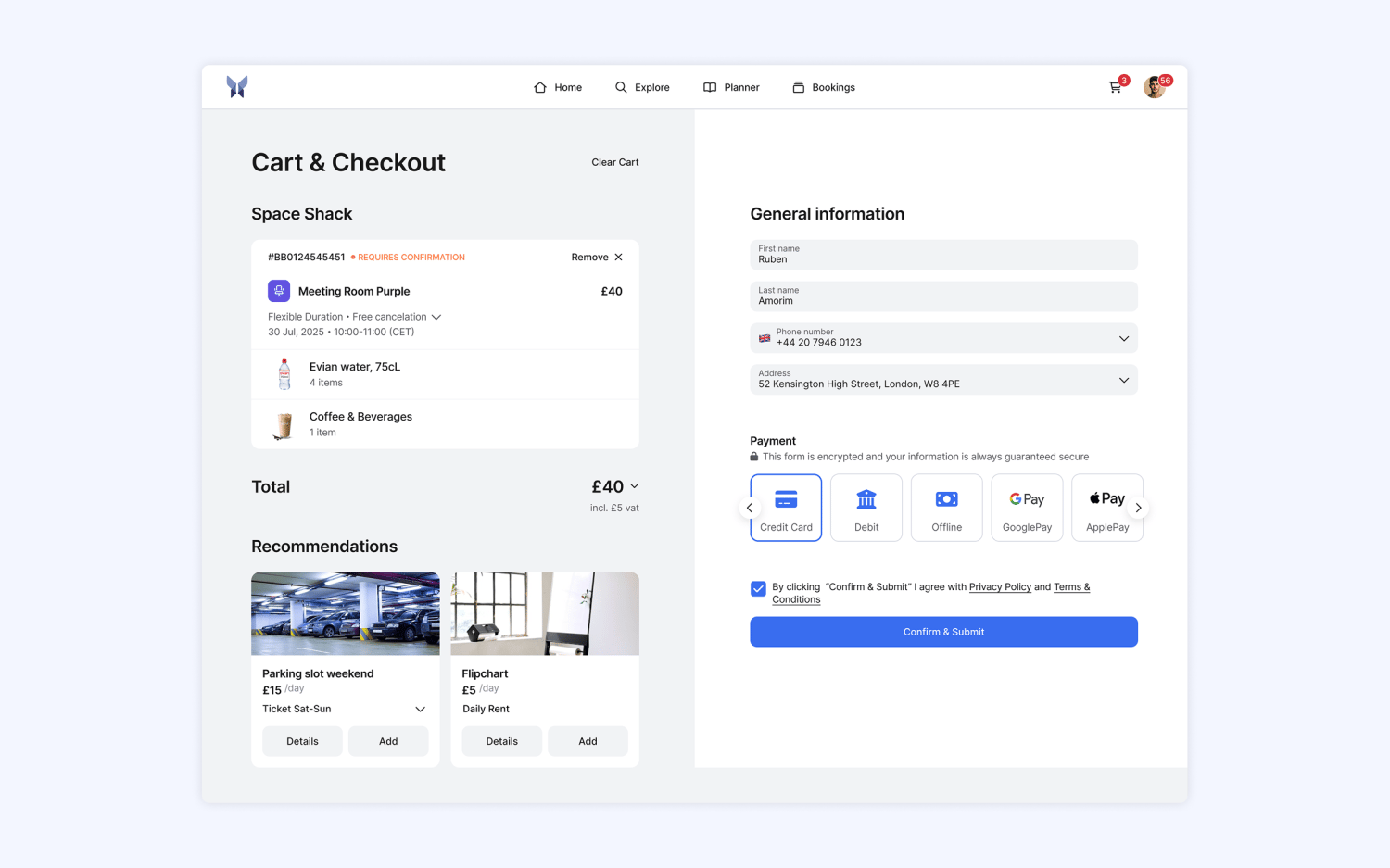 ### **Shopping cart & check-out**
The checkout and shopping cart process has been further developed so that bookings can be completed smoothly.
The most important new features at a glance:
* **New design & layout -** Modern and intuitive for a pleasant booking experience.
* **Optimized booking summary**
* \*\*Clear structure -\*\*See all bookings at a glance in a structured list.
* **Batch view for event bookings -** Multiple bookings, e.g. for the same event, are now visually summarized as a batch for a better overview.
* **Recommendations in the shopping cart & checkout -** During the booking process, recommendations you have set for other suitable resources now appear. Recommendations can be set via ‘additional options’ in the settings of the service/booking option.
* \*\*Upload documents as custom field -\*\*Documents can now be uploaded directly in the checkout to save you further work steps.
### **Shopping cart & check-out**
The checkout and shopping cart process has been further developed so that bookings can be completed smoothly.
The most important new features at a glance:
* **New design & layout -** Modern and intuitive for a pleasant booking experience.
* **Optimized booking summary**
* \*\*Clear structure -\*\*See all bookings at a glance in a structured list.
* **Batch view for event bookings -** Multiple bookings, e.g. for the same event, are now visually summarized as a batch for a better overview.
* **Recommendations in the shopping cart & checkout -** During the booking process, recommendations you have set for other suitable resources now appear. Recommendations can be set via ‘additional options’ in the settings of the service/booking option.
* \*\*Upload documents as custom field -\*\*Documents can now be uploaded directly in the checkout to save you further work steps.
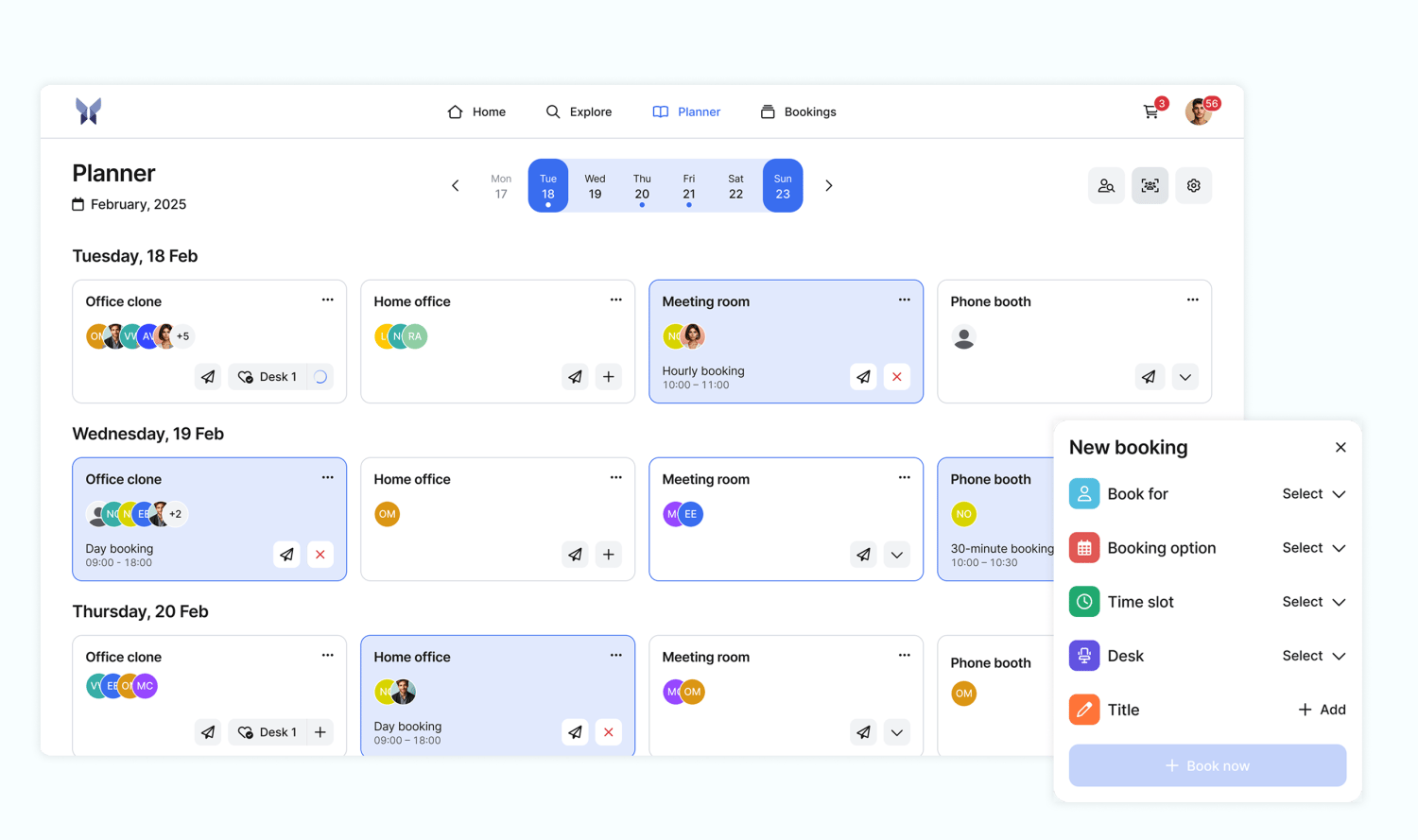 ### **Planner**
The week planner is now called Planner and has been comprehensively improved. It offers more intuitive navigation and more control over your bookings.
The most important new features at a glance:
* **Simplified onboarding & favorites management**
* **Add or remove favorites directly in the Planner -** You don't have to open a separate page, which saves time and makes your booking process more efficient.
* **Complete list of all accessible resources (incl. child resources) -** Select your favorites with just one click.
* **Filter by community -** Show only your favorite resources within a selected community to book exactly what you need faster.
* **Optimized booking creation & management**
* \*\*No more ‘+ New Booking’ button -\*\*Bookings can now be completed in no time at all via the new Explore page.
* **Multiple bookings possible -** Instead of booking the same resource only once a day, you can now book e.g. a meeting room several times a day in the planner.
* **Book for other people**- If you have the authorization, you can book for someone else directly via the planner (book-on-behalf).
* **New context menu for resources (three-dot menu)**
* \*\*‘Book on behalf of...’ -\*\*Carry out bookings for others.
* **‘Add/remove to favorites’ -** Quick and uncomplicated favorites management without detours.
* **‘Show resource page’ -** Direct access to all important details.
* **Visible booking title -** Titles are now displayed directly in the booking preview so that you can identify bookings more quickly and keep a better overview.
* \*\*Search for members, sorted by distance -\*\*The button for searching for members has been moved to the top right of the Planner. If a filter by roles or properties is active, people are automatically sorted by distance.
* \*\*Connect with team members (Connected Persons) -\*\*Connect with colleagues to manage bookings together and increase your visibility in the team.
* \*\*Manage favorite resources -\*\*The new settings button at the top right of the Planner can be used to directly manage the displayed, favorite resources.
### **Profile page**
Your profile gets a fresh, modern design that seamlessly adapts to the mobile app.
The most important new features at a glance:
* **New, modern design** - Clearer and based on the mobile app for a standardised user experience.
* **Management of connections (Connected Persons) -** You can easily manage your connections from the new Connected Persons feature here.
## Send messages to your users with the broadcasting feature 📣
Until now, targeted communication to individual users has been difficult to implement. This changes with our new broadcasting feature.
No matter whether you want to inform them about room changes, a course is canceled, or you want to remind them of the workplace bookings for the next week. From now on, you can communicate with your users quickly, easily, and in a targeted manner - directly from anny.
### What is the broadcasting feature?
Broadcasting allows you to send messages to selected recipients. You can use various filters to determine the exact group of recipients and decide who receives the message, when, and via which channel.
Your advantages at a glance:
* **Targeted recipient lists:** Filter your users according to booking details (e.g. booked resource, time period) or customer data (e.g. community affiliation, birthday).
* **Multi-channel dispatch:** Reach your users wherever they are. Choose between email, SMS and push notifications in the anny app.
* **Personalized approach:** Use placeholders such as #firstname or #resource to make your messages more personal and relevant.
* **Save templates:** Create a message once and use it again and again to save time.
### Use cases
To show you how versatile the new feature is, we have collected a few examples for you here:
**One-time messages for current events**
* **Changed opening hours:** “Dear users, our coworking space will be closed on the upcoming public holiday.” Send this information to all members of your coworking community.
* **Room closed:** “Attention: The ‘Kreativ’ meeting room is closed today for maintenance work.” Only inform users who have booked this room for today.
* **Special events:** "Our summer party is taking place next week! Register now." Invite all your users with just one message.
**Recurring messages that work for you automatically**
* **Daily birthday greetings:** "Happy birthday, #firstname! We're giving you 10% off your next booking today." A small gesture with a big impact that automatically goes to the birthday children of the day.
* **Reminder to return equipment:** “Please remember to return the #resource you borrowed.” Sends automatically to everyone whose loan is overdue.
* **Weekly planning:** "Plan your week now! You've booked less than 3 days in the office so far." A friendly nudge to your team to plan the coming week in the office.
### Ready to get started
Try out the broadcasting feature for yourself! You can find it in your anny account in the **Customers → Broadcasting** section. If you have any questions or are looking for detailed instructions, you can find all the information you need in our [Help Center article](https://docs.anny.co/en/articles/304524-broadcasting?utm_source=newsletter\&utm_medium=email\&utm_campaign=customers-eu-en-new-at-anny-send-messages-to-your-users-with-the-broadcasting-feature).
## anny app 2.1.2
We just released a new version of the anny app. This version provides, besides some bug fixes, some new improvements:
* Manage community invitees directly inside the app
* Tickets of the queuing system can be opened inside the anny app
* Pay invoices later inside the app
* Open community pages directly inside the anny app
## All booking rules in one central location
Booking rules in anny can be used to restrict how many bookings your users are allowed to make for a certain period of time. The settings for these rules were located in different places, depending on whether these rules should apply to a resource, a group or the entire organization.
### **Planner**
The week planner is now called Planner and has been comprehensively improved. It offers more intuitive navigation and more control over your bookings.
The most important new features at a glance:
* **Simplified onboarding & favorites management**
* **Add or remove favorites directly in the Planner -** You don't have to open a separate page, which saves time and makes your booking process more efficient.
* **Complete list of all accessible resources (incl. child resources) -** Select your favorites with just one click.
* **Filter by community -** Show only your favorite resources within a selected community to book exactly what you need faster.
* **Optimized booking creation & management**
* \*\*No more ‘+ New Booking’ button -\*\*Bookings can now be completed in no time at all via the new Explore page.
* **Multiple bookings possible -** Instead of booking the same resource only once a day, you can now book e.g. a meeting room several times a day in the planner.
* **Book for other people**- If you have the authorization, you can book for someone else directly via the planner (book-on-behalf).
* **New context menu for resources (three-dot menu)**
* \*\*‘Book on behalf of...’ -\*\*Carry out bookings for others.
* **‘Add/remove to favorites’ -** Quick and uncomplicated favorites management without detours.
* **‘Show resource page’ -** Direct access to all important details.
* **Visible booking title -** Titles are now displayed directly in the booking preview so that you can identify bookings more quickly and keep a better overview.
* \*\*Search for members, sorted by distance -\*\*The button for searching for members has been moved to the top right of the Planner. If a filter by roles or properties is active, people are automatically sorted by distance.
* \*\*Connect with team members (Connected Persons) -\*\*Connect with colleagues to manage bookings together and increase your visibility in the team.
* \*\*Manage favorite resources -\*\*The new settings button at the top right of the Planner can be used to directly manage the displayed, favorite resources.
### **Profile page**
Your profile gets a fresh, modern design that seamlessly adapts to the mobile app.
The most important new features at a glance:
* **New, modern design** - Clearer and based on the mobile app for a standardised user experience.
* **Management of connections (Connected Persons) -** You can easily manage your connections from the new Connected Persons feature here.
## Send messages to your users with the broadcasting feature 📣
Until now, targeted communication to individual users has been difficult to implement. This changes with our new broadcasting feature.
No matter whether you want to inform them about room changes, a course is canceled, or you want to remind them of the workplace bookings for the next week. From now on, you can communicate with your users quickly, easily, and in a targeted manner - directly from anny.
### What is the broadcasting feature?
Broadcasting allows you to send messages to selected recipients. You can use various filters to determine the exact group of recipients and decide who receives the message, when, and via which channel.
Your advantages at a glance:
* **Targeted recipient lists:** Filter your users according to booking details (e.g. booked resource, time period) or customer data (e.g. community affiliation, birthday).
* **Multi-channel dispatch:** Reach your users wherever they are. Choose between email, SMS and push notifications in the anny app.
* **Personalized approach:** Use placeholders such as #firstname or #resource to make your messages more personal and relevant.
* **Save templates:** Create a message once and use it again and again to save time.
### Use cases
To show you how versatile the new feature is, we have collected a few examples for you here:
**One-time messages for current events**
* **Changed opening hours:** “Dear users, our coworking space will be closed on the upcoming public holiday.” Send this information to all members of your coworking community.
* **Room closed:** “Attention: The ‘Kreativ’ meeting room is closed today for maintenance work.” Only inform users who have booked this room for today.
* **Special events:** "Our summer party is taking place next week! Register now." Invite all your users with just one message.
**Recurring messages that work for you automatically**
* **Daily birthday greetings:** "Happy birthday, #firstname! We're giving you 10% off your next booking today." A small gesture with a big impact that automatically goes to the birthday children of the day.
* **Reminder to return equipment:** “Please remember to return the #resource you borrowed.” Sends automatically to everyone whose loan is overdue.
* **Weekly planning:** "Plan your week now! You've booked less than 3 days in the office so far." A friendly nudge to your team to plan the coming week in the office.
### Ready to get started
Try out the broadcasting feature for yourself! You can find it in your anny account in the **Customers → Broadcasting** section. If you have any questions or are looking for detailed instructions, you can find all the information you need in our [Help Center article](https://docs.anny.co/en/articles/304524-broadcasting?utm_source=newsletter\&utm_medium=email\&utm_campaign=customers-eu-en-new-at-anny-send-messages-to-your-users-with-the-broadcasting-feature).
## anny app 2.1.2
We just released a new version of the anny app. This version provides, besides some bug fixes, some new improvements:
* Manage community invitees directly inside the app
* Tickets of the queuing system can be opened inside the anny app
* Pay invoices later inside the app
* Open community pages directly inside the anny app
## All booking rules in one central location
Booking rules in anny can be used to restrict how many bookings your users are allowed to make for a certain period of time. The settings for these rules were located in different places, depending on whether these rules should apply to a resource, a group or the entire organization.
For example, the rule that a resource may only be booked once a day by a user was defined in the resource settings.
To ensure that you still have a perfect overview of your booking rules, you can now find all booking rules in one central place in the account settings. Here you can set the m**aximum number of bookings per user**, which **time window** is considered and whether this **rule should apply to all bookings or only to certain resources, resource groups or categories, services or service groups**.
We have also enhanced the booking rules with useful functions to give you even more flexibility:
**🚧 Restrict your rules to individual user groups**
You now also have the option of excluding individual users or entire domains from a rule, or specifying that the rule should only apply to a certain person or customer group.
**⚠️ Individual error messages**
You can now also display individual error messages for your users if they want to make a booking but are not allowed to do so by a rule. This provides them with direct feedback, which saves you questions.
**⛔️ Prevent certain users from being able to book (blacklist)**
You may want to exclude a certain group of users from being able to book. Whether it's customers who often don't show up for their appointments or students who have not behaved correctly. You can now exclude them from making bookings via the rules and thus keep a so-called blacklist.
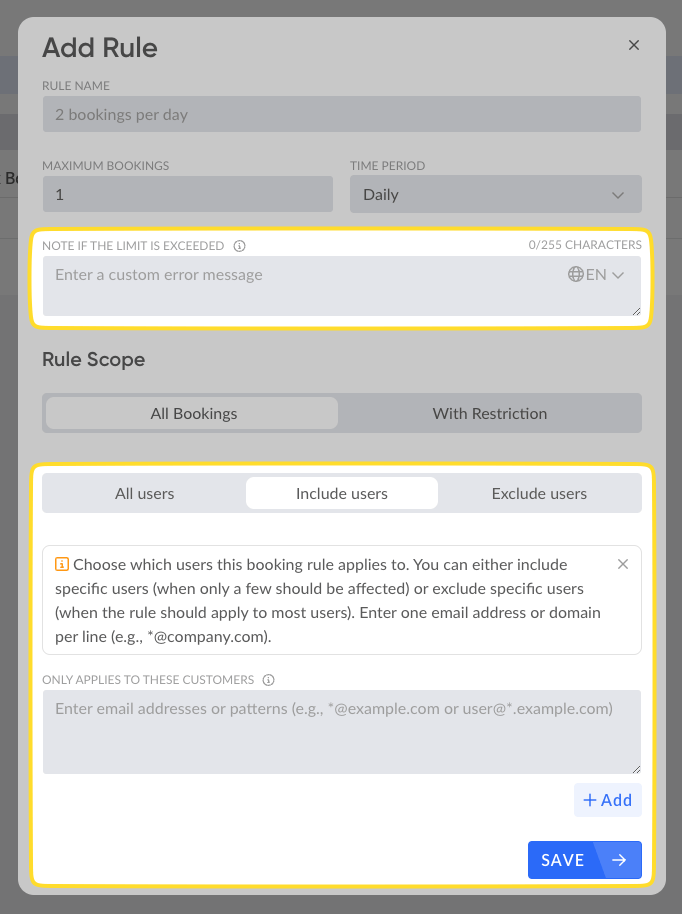 ## WAYFless directly with anny app
With the latest improvements, a Login with a WAYFless-URL will be directly opened within the anny app. This allows your users to log in directly to the app and prevents unnecessary redirects.
## WAYFless directly with anny app
With the latest improvements, a Login with a WAYFless-URL will be directly opened within the anny app. This allows your users to log in directly to the app and prevents unnecessary redirects.